Classifying Fields with Sample Values
Content classification is a second classification pass that reads a few real values from a data store column, for when the column's name, type and description aren't enough for the Astralis classifier to label it confidently. Astralis samples up to 10 values from each field, sends them to your Amazon Bedrock model with the field's metadata, and shows the new label on the field. The first label stays one click away.
It tends to help most on data stores with cryptic column names, such as field1, attr_x or c17, where the classifier has little to go on and says so with a low confidence rating.
You can run it in two ways, and use either or both:
- When you classify. Tick Use sample values in the Classify confirm to sample the fields you're classifying.
- Automatically. Have the monitor sample fields at or below a confidence threshold after every classification, including scheduled ones.
Guidance on when sampling pays off is still developing. Sampling on request is an easy way to try it on a few tables and see whether the labels improve; automatic sampling is worth exploring for monitors where it does.
Content classification requires Astralis 3.3.0 or later. On a self-hosted deployment, you turn it on yourself and it calls your own Amazon Bedrock account. On Astralis Cloud or Astralis Serverless, contact Ethyca Support to discuss enabling it.
Content classification is off by default. It takes three things to turn it on: a deployment setting, the LLM classifier with a Bedrock model on the monitor, and the monitor's own Classify with sample values switch. The switch is the monitor's opt-in: with it on, reviewers can sample fields when they classify. Sampling automatically after every classification is an optional, separate choice on top of it. Before you turn it on, read Before you turn it on: it sends real values from your data stores to your LLM provider and runs queries against your data stores.
How it works
- The monitor classifies its fields as usual, from names, types, descriptions and table context. Those labels are written and reviewable straight away.
- Astralis picks the fields to sample. When you classify with Use sample values, those are the fields you classified, besides fields an exclude rule covers. When the monitor samples automatically, they're the fields its
content_classifyinclude rules cover whose top label has a confidence rating at or below the rule's threshold, once each classification finishes; fields labeled by a regex pattern, fields a reviewer has already acted on, fields already sampled, and fields an exclude rule covers are left out. - Astralis queues one content classification task over those fields. It shows in the monitor's Activity with the number of fields, for example Sampling 28 fields.
- The task works one table at a time. It reads up to 10 distinct, non-blank values per field through the monitor's own connection, shuffles each column's values on their own so no row is laid out across columns, and sends them with the table's metadata to the monitor's Bedrock model, in one call per table or, for a table with many fields to sample, one call per batch of fields, as the first pass does. When the prompt carries values, it asks the model for labels and confidence ratings only, never a rationale.
- Astralis stores both results on the field and shows the sampled one. The values themselves are discarded once the model has answered.
Sampling never fails a classification. If a field's sample query fails, times out or returns nothing, the field is classified again from its metadata alone. See What happens when sampling fails.
Before you turn it on
Content classification changes what Astralis reads from your data stores and where those values go. Review the points below with the owners of the data stores, your AWS account owners and your security team before you switch it on. Content classification data handling has the full statement.
Security and privacy
- Values leave the data store, and go to the monitor's Amazon Bedrock model. Up to 10 values per sampled field, each cut to 256 characters, go to the Bedrock model the monitor uses, in the AWS account and region its credentials reach. Bedrock is the only provider content classification supports today, so a monitor whose model is on another provider, such as OpenRouter, can't use it. See Set a Bedrock model on the monitor.
- Astralis stores no value. Values exist in the worker's memory between the sample query and the model's answer. They're never written to the Astralis database, Redis, task results, the audit log or Astralis' logs.
- Bedrock can store them, depending on your AWS settings. When Amazon Bedrock model invocation logging is on, it writes every prompt to CloudWatch Logs or S3, and the prompt carries the values. Astralis can't see that setting. See Check Bedrock model invocation logging.
- Astralis can read rows, not just metadata. The monitor's account needs read access to the rows of every table you sample, the same access field sample preview needs. Grant it only on the schemas or tables you want sampled.
- Values are data, not instructions. Anyone who can write to a column can put text in it. The prompt tells the model to treat sample values as data, the model returns only taxonomy labels and ratings, and a reviewer still approves every label.
- Every run and every rule change is audited. See What is audited.
Operational
- Classification workers query your data stores. The sampling runs in the content classification task on the classification queue,
fidesplus.discovery_monitors_classification, so your classification workers need network access to the monitor's data stores. If the monitor's connection points at a production primary, samples are read there. - Load is bounded. Only the fields a rule or a request covers and the threshold selects are sampled, a request names at most 100 schemas, tables or fields, with the same per-query time limits as field sample preview, and each task stops sampling after 120 seconds in total. Fields past that point are classified again from metadata only.
- Some samples cost money. Sampling reads data the same way field sample preview does, so the same costs apply: Snowflake warehouse time, BigQuery view queries and Salesforce API calls. See Supported data stores.
- It adds LLM spend. The second pass makes at least one more Bedrock call per table that has fields to sample, carrying that table's metadata and the sampled values.
- You can turn it off at once. With the deployment setting off, no content classification task is queued, and a task that was queued but hasn't started samples nothing. A task that's already running checked the setting when it started and runs to the end; click Stop to end it sooner. Turning off a monitor's Classify with sample values switch works the same way for that monitor: nothing new is queued or requested, a running task finishes unless you stop it, and the monitor's
content_classifyrules stay in place, inert until the switch is on again. The one exception is the form's own whole-monitor rule, which saving the monitor form with the switch off deletes.
Before you begin
- A data store monitor on a data store that supports sampling: PostgreSQL, MySQL, Microsoft SQL Server, Snowflake, BigQuery or Salesforce, including their Amazon RDS and Google Cloud SQL variants. See Supported data stores.
- The LLM classifier with Amazon Bedrock set up for the deployment, with
FIDESPLUS__DETECTION_DISCOVERY__LLM_CLASSIFIER_ENABLED=true. - The monitor's Use LLM classifier switch on (
classify_params.context_classifierset tollm), on the monitor or its shared configuration. - Row read access for the monitor's data store account. See Data store access.
- Permission to edit the monitor (the
discovery_monitor:updatescope, held by Owners and Contributors) to turn the monitor's switch on and to writecontent_classifyrules.
Check Bedrock model invocation logging
Amazon Bedrock model invocation logging records the full prompt of every call, and the content classification prompt carries sample values. When it's on in the AWS account and region your Bedrock calls reach, those values are kept in the log destination it names, under that destination's retention and access controls. It can't be limited to particular models: it records calls to every model in that account and region. Astralis can't check this setting for you.
Whether that's acceptable is your organization's decision. Some teams turn logging off in accounts that receive sample values; others keep it on for auditing and treat the log destination as holding the same data as the sampled columns.
To see the setting, open Settings in the Amazon Bedrock console for that region, or run:
aws bedrock get-model-invocation-logging-configuration --region us-east-1An empty response means logging is off. If it returns a loggingConfig, the account stores prompts, sample values included, in the CloudWatch Logs group or S3 bucket it names.
Check every region a call can reach. A cross-region inference profile, such as one whose ID starts with us., can route a call to any region in its group.
Turn on content classification for the deployment
On Astralis Cloud or Astralis Serverless, Ethyca Support makes this change; contact them to discuss enabling it. On a self-hosted deployment, set the deployment setting on the Astralis webserver and on every worker, then restart them:
FIDESPLUS__DETECTION_DISCOVERY__CONTENT_CLASSIFICATION_ENABLED=trueOr, in fides.toml:
[detection_discovery]
content_classification_enabled = true
The setting can't be changed through the API or the Admin UI. Turning it off stops content classification on the whole deployment right away, whatever each monitor's switch says. See Configuration.
This setting is unrelated to the legacy classifier's classify_params.content_classification_enabled parameter, which Astralis is retiring. Content classification doesn't read it.
Set the AWS region
Nothing in the classification path sets an AWS region. When the model is an ARN, its region is used. Otherwise the LLM library falls back to the AWS_REGION_NAME and AWS_REGION environment variables, then the AWS SDK's default region (AWS_DEFAULT_REGION or the AWS config file), in that order, and to us-west-2 when none is set. Set one of them on every worker to a region your Bedrock credentials are allowed to call, and whose model invocation logging settings you've reviewed. On EKS with IRSA, AWS_REGION is usually set for you.
Keep LLM library debug logging off
Astralis calls Bedrock through the LiteLLM library, which writes the full request, sample values included, to its logs at debug level. Astralis keeps LiteLLM's loggers at INFO or above whatever the application's log level, unless you set the LITELLM_LOG environment variable.
While LiteLLM could log a request, content classification sends no values. That's the case when:
LITELLM_LOGis set toDEBUG, or any LiteLLM logger is otherwise enabled for debug,- LiteLLM's
set_verboseis on, or - a LiteLLM callback is configured.
Fields are then classified again from metadata only, and the worker logs Sampling for classification skipped for a table of monitor <key>: (library_exposes_requests). Unset LITELLM_LOG, or set it to INFO or above, to sample again.
Set a Bedrock model on the monitor
Content classification supports models on Amazon Bedrock today, so the monitor's classification model must be one. Set the monitor's Model override to a Bedrock model ID or ARN that starts with bedrock/, bedrock_mantle/ or arn:aws:bedrock:, such as bedrock/us.anthropic.claude-haiku-4-5-20251001-v1:0 or bedrock_mantle/google.gemma-4-31b. If the monitor uses a shared configuration with its own model override, that override wins, so set it there.
A monitor with no model override uses the default classification model, which isn't on Bedrock, so it can't use content classification.
Bedrock is supported because that's how Ethyca builds and runs content classification today, not because other providers are unsuitable. If your deployment runs on another cloud, such as Google Cloud, and you'd rather keep sample values with that cloud's models, contact Ethyca Support to discuss it.
Bedrock Mantle is Amazon Bedrock's OpenAI-compatible endpoint, so sample values sent to a model on it, such as Gemma 4 31B, stay with AWS as they do on classic Bedrock. Check that your AWS data-handling terms and invocation-logging settings cover the Mantle endpoint too. A Mantle model also needs the Mantle setup the first classification pass needs.
Turn on content classification for a monitor
Each monitor has two choices, made in its Sampling section:
| Control | What it does |
|---|---|
| Classify with sample values | The monitor's opt-in. With it on, the monitor's values may go to its Bedrock model, and reviewers can tick Use sample values when they classify any of its fields. With it off, nothing is sampled on the monitor. Saved with the monitor as sampling_config.content_classification_enabled. |
| Sample automatically after each classification | Shown only when the first switch is on. Its help reads "Runs after every classification of this monitor, including scheduled runs. Leave this off to sample only when you choose to in Classify." Samples fields after every classification of the monitor. Turning it on creates a content_classify path rule that covers the whole monitor (pattern ^); turning it off deletes that rule. |
| Fields to sample automatically | Shown only when automatic sampling is on. The threshold for automatic runs: All fields samples every field, Medium and below (the default) samples fields whose top confidence rating is 4 or lower, and Low confidence samples 3 or lower. It edits the rule's max_confidence. |
- Check that the monitor's data store account can read rows. See Data store access.
- Open the integration and edit the monitor.
- In the Sampling section, switch on Classify with sample values.
- Optionally, to sample after every classification, switch on Sample automatically after each classification and choose Fields to sample automatically. Leave it off to sample only when a reviewer ticks Use sample values when they classify.
- Save the monitor.
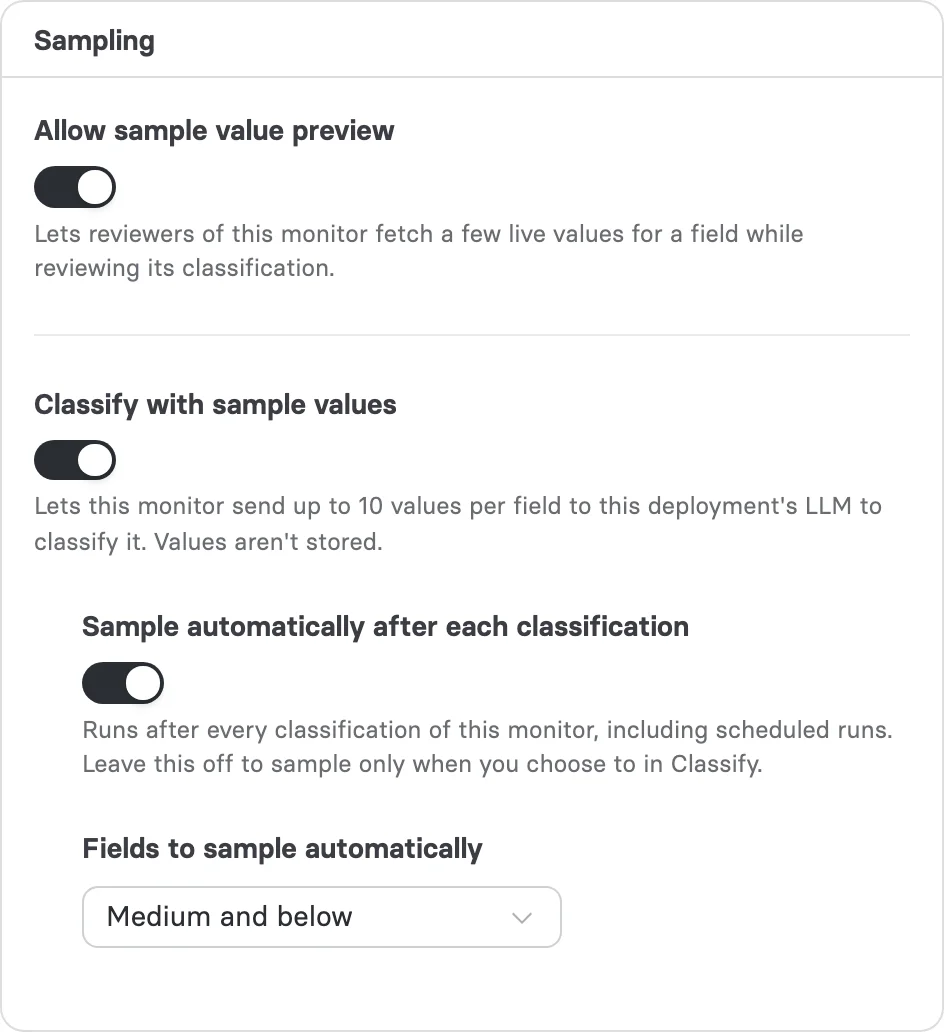
The Sampling section appears only when the monitor's data store supports sampling and the deployment has field sample preview or content classification turned on. When content classification is off for the deployment, Classify with sample values is disabled with Turned off for this deployment.
Saving the monitor with Classify with sample values newly on checks every setting a run needs: the deployment setting is on, the data store supports sampling, the monitor's model is on Amazon Bedrock, LLM classification is on for the deployment, and the monitor uses the LLM classifier. A monitor that's already opted in is checked again only by a save that changes its connection, its classifier or its model override. If a check fails, the monitor isn't saved and the form names the reason after "Content classification can't run with these settings:". Any other save doesn't check, so an unrelated edit is never blocked; every run checks again before it samples.
The form checks what it can before you save, and shows the result under Classify with sample values:
| When | The form shows |
|---|---|
| The switch is off and a setting it needs is missing | The switch is disabled, with what it needs, such as "Needs the LLM classifier. Turn on Use LLM classifier." |
| You turn the switch on, or change the classifier or model override of an opted-in monitor, and a setting it needs is missing | An error ending "Or turn this off to save without it." The monitor can't be saved until you fix the setting or turn the switch off. |
| The monitor is already opted in, a setting it needs is missing, and the save doesn't change the classifier or model override | An amber warning ending "Sampling won't run until this is fixed. Other changes still save." The monitor saves, but no run samples until the setting is fixed. |
The form checks the model override only when one is set; with none, the server checks the deployment's default model when you save.
Sample automatically after each classification is saved after the monitor. If saving its rule fails, the monitor is still saved and the form says so: "Monitor created, but automatic checks were not turned on:" for a new monitor, or "Monitor saved, but the automatic check setting was not:" for an existing one, followed by the reason. If the monitor takes long to save, the form closes with a note that ends "Automatic checks are set once the monitor saves; you'll see a message if they can't be." See Troubleshooting.
The switch is independent of Allow sample value preview. Each can be on without the other. When both are on, reviewers can open the values the classifier saw from the same place they see its result. See Verifying a classification with sample values. Each monitor has its own switch and rules, never inherited from a shared configuration, and every change to the switch is recorded in the audit log.
Turning on automatic sampling doesn't sample fields that are already classified. Automatic sampling starts after the monitor's next classification. To sample fields that are already classified, select them and classify with Use sample values.
Turning Classify with sample values off stops new runs on the monitor, automatic or requested. Saving the monitor form with the switch off also deletes the form's own rule, the single whole-monitor include rule that Sample automatically after each classification manages, so turning the switch back on later doesn't restart automatic sampling by itself. The monitor's other content_classify rules stay in place, inert, and apply again when the switch is turned back on; when the monitor has rules the form doesn't manage, the form says so under the switch: "This monitor's path rules stay and apply again when this is turned on." Turning the switch off through the API deletes no rule. A task that's already running finishes; click Stop to end it sooner.
To change the switch through the API, set sampling_config.content_classification_enabled on the monitor. See Monitor API.
Sample only some schemas, tables or fields
Sample automatically after each classification samples across the whole monitor. To sample automatically on only some paths, or to set a different threshold per path, write content_classify path rules through the API instead. Rules decide only what runs automatically; the Classify with sample values switch must be on for any of them to apply.
The form edits only its own rule: a single include rule on the whole monitor (pattern ^) at one of the thresholds it offers. Exclude rules on narrower paths don't change that. The form leaves them alone and says how many there are under the switch, for example "2 exclude rules skip their paths." The form shows Configured by path rules. in place of the switch, with a sentence on what the rules cover and a Learn more link to this section, when the monitor has:
- any include rule other than that one
^rule, - a
^include rule at a threshold the form doesn't offer (max_confidence1 or 2), or - an exclude rule on
^. It keeps every field out of automatic sampling whatever the include rules say, and the form reads "Nothing is checked automatically: an exclude rule covers the whole monitor."
Change those rules with the path rules API.
A content_classify rule works like a detection path rule, with these differences:
- Nothing is sampled automatically without an include rule. Detection treats "no include rules" as "everything". Content classification treats it as "nothing automatic"; reviewers can still request runs.
- An include rule's
paramsset the threshold.max_confidenceis an integer from 1 to 5, default 4: fields whose top confidence rating is at or below it are sampled. When several include rules cover a field, the most specific rule, the one naming the lowest level of the field's path, supplies the threshold; between rules naming the same level, the one created first wins. - Exclude always wins, as in detection, and on every run: a field an exclude rule covers is never sampled, automatically or on request. Exclude rules take no
params. collapseisn't allowed.- Include rules need the switch on. Creating or updating an include rule, or changing a rule to include, returns
422while the monitor's switch is off, or while any other setting a run needs is missing. - Exclude rules can be written at any time, whatever the switch and the deployment setting say. Write them before you turn anything on to keep paths out of sampling from the start.
For example, this include rule samples only low-confidence fields in the crm schema of the analytics database. Add it as described in Add a path rule:
{ "pattern": "^analytics\\.crm\\.", "action": "content_classify", "effect": "include", "params": { "max_confidence": 3 } }Rules apply from the next time content classification picks fields, automatically or for a request; a task that's already running keeps the fields it started with. See Path rules in the Monitor API reference for every field and status code.
Review sampled fields
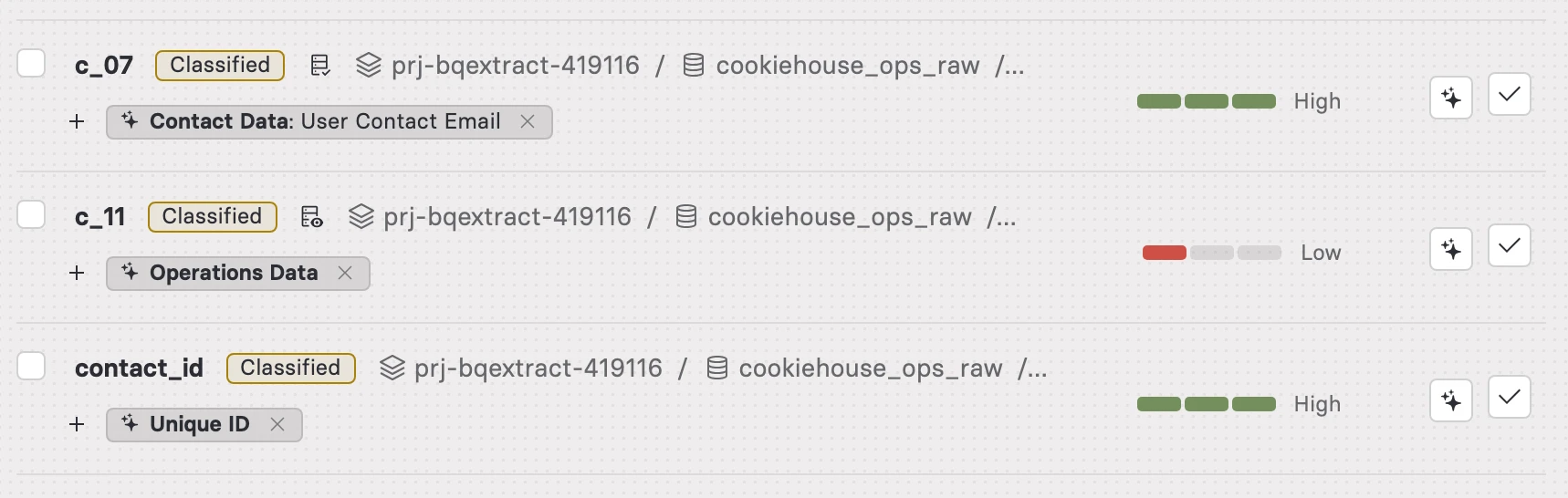
After a classification that had fields to sample, or a run you requested, the monitor's results show which fields were sampled:
| You see | Meaning |
|---|---|
| Sampling icon after the field's status, with the tooltip Sampling | The field is queued for, or in, a content classification task. It keeps its current label and confidence until the task reaches it. |
| Sampled icon after the field's status, with the tooltip Sampled | The second pass read values for the field and returned a label. The field shows that label, and its confidence gauge shows that label's confidence. |
| No icon | The field wasn't sampled, the second pass's model call failed for it, the second pass ran from metadata only, or the earlier label was chosen over the sampled one. |
A field whose sample query failed or returned nothing, or that was past the task's sampling time, still gets the second pass from its metadata alone. Its new label is shown, without the Sampled icon, and its details say Classified again from name and type only; no sample values were read. The task's audit row counts those fields under sampler_failed or budget.
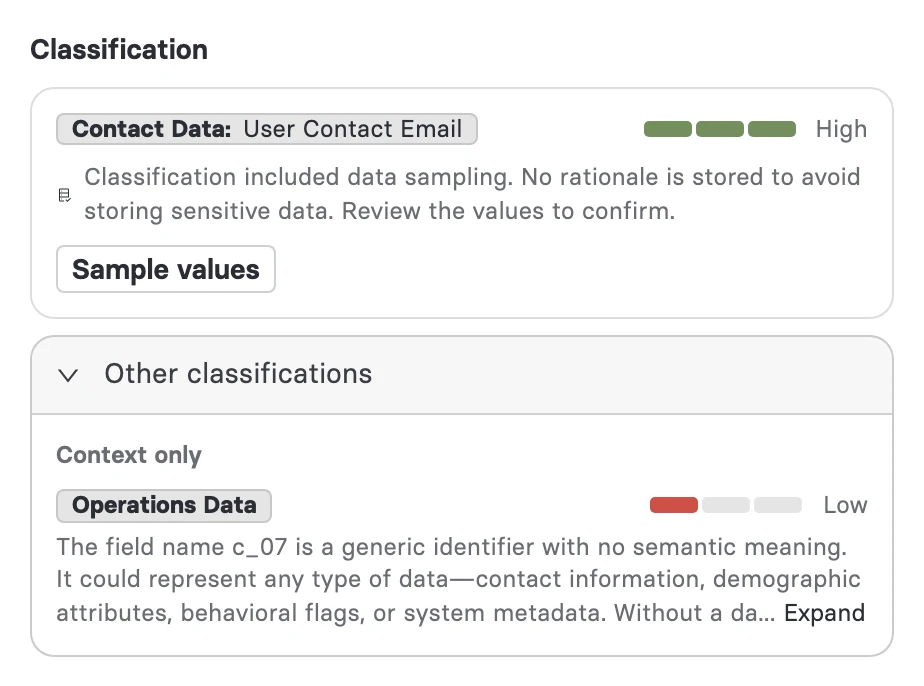
Click a sampled field to open its details. Under Classification, the card shows the sampled label and its confidence. When field sample preview is on for the monitor, the card says Classification included data sampling. No rationale is stored to avoid storing sensitive data. Review the values to confirm. and a Sample values button below it opens the field's current values, so you can check the label against them; without preview the card stops after No rationale is stored to avoid storing sensitive data. There's no rationale because Astralis never asks for one when values are in the prompt and never stores one for the second pass.
Below the card, Other classifications opens the earlier label under Context only: the label, confidence and rationale the classifier gave from the field's metadata alone. To use a different label, edit the field's data categories as usual.
Find sampled fields
Use the Sample values filter on the monitor's field list:
| Option | Fields shown |
|---|---|
| Sampling | Queued for, or in, a content classification task |
| Sampled, label changed | Sampled; the sampled label differs from the earlier one and is shown |
| Sampled, label confirmed | Sampled; the sampled label is the same as the earlier one |
| Sampled, label kept | Sampled; the earlier label is shown |
| Sampling failed | Sampled, but the model call failed or returned no label; the earlier label is shown |
| Not sampled | No content classification result |
Follow a run
While a content classification task runs, the monitor card in the overview panel of the monitor's results shows Sampling, a progress bar and the number of fields. When it ends, the card shows Sampling finished, Sampling stopped or Sampling failed until you reload the page. The monitor's Activity lists the task with its field count, for example Sampling 28 fields while it runs and Sampled 28 fields when it's done.
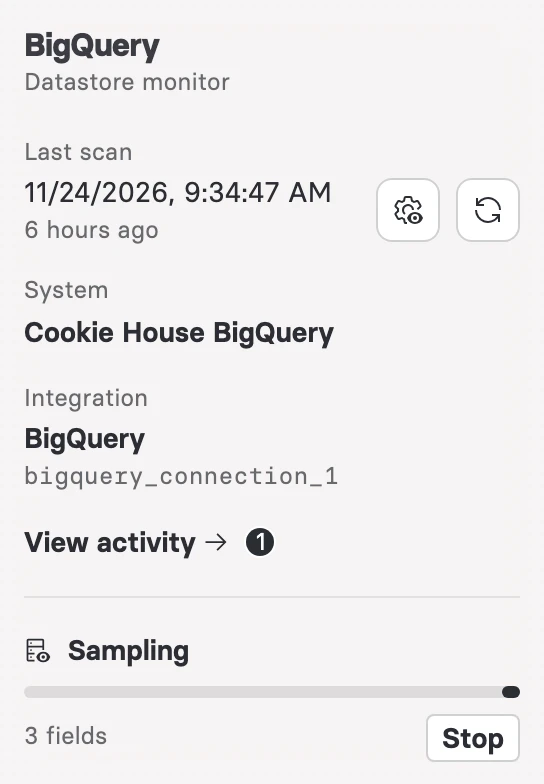
To stop a run, click Stop. The table being sampled finishes, the remaining fields keep their earlier labels, and the task shows as Sampling stopped. The next automatic run, or a classification with Use sample values, picks the remaining fields up again. A stopped task can't be resumed or retried from Activity.
Sample values when you classify
To sample fields as you classify them, tick Use sample values in the Classify confirm on the monitor's field list. It works on the fields you select and on all the fields a filter matches.
- Select the fields to classify, or filter the list, and click Classify.
- In the confirm, tick Use sample values. Under it, the confirm says: "Reads up to 10 values per field and sends them to this deployment's LLM. Values aren't stored."
- Confirm. The message reads "Classifying N resources, then sampling values".
When the classification finishes, Astralis queues one content classification task over exactly the fields that classification labeled, and no others. The include rules and their thresholds aren't read, and fields that were already sampled are sampled again. Fields an exclude rule covers, fields labeled by a regex pattern, fields a reviewer has acted on, and fields a running task holds are still left out. The task's Content classification run requested audit row names you and the classification task.
Use sample values is unticked every time, and shows only when content classification can run on the monitor now: its Classify with sample values switch is on and every other gate passes. Otherwise the confirm shows no checkbox, and Classify classifies from metadata only. Classifying a single field normally skips the confirm, but while the checkbox is offered, a single field gets the confirm too.
When the monitor also samples automatically, because it has a content_classify include rule and no exclude rule on the whole monitor, an info icon follows the checkbox: "Automatic sampling is on for this monitor, so some fields are sampled even if this is unticked." With the box unticked, the classification still triggers an automatic run over the fields its rules cover.
If a gate fails between opening the confirm and confirming, nothing is classified and the message reads "Sample values isn't available for this monitor."
Request a run through the API
Content classification can also be queued through the Monitor API without classifying again, for scripts and other automation. A request names up to 100 schemas, tables or fields of a monitor whose Classify with sample values switch is on, and can preview what it would cover first. See Content classification in the Monitor API reference for the routes, their parameters and status codes.
Troubleshooting
| What you see | Why | What to do |
|---|---|---|
| No Classify with sample values switch | The monitor's data store doesn't support sampling, or neither sampling setting is on for the deployment | Check Supported data stores, or set FIDESPLUS__DETECTION_DISCOVERY__CONTENT_CLASSIFICATION_ENABLED=true. |
| Classify with sample values is disabled with Turned off for this deployment. | The deployment setting is off | Set the deployment setting and restart the webserver and workers. |
| Sample automatically after each classification is replaced by Configured by path rules. | The monitor has an include rule other than the single whole-monitor ^ rule the form creates, a ^ include rule at max_confidence 1 or 2, or an exclude rule on ^ | See Sample only some schemas, tables or fields. |
| Classify with sample values is disabled with a message starting "Needs" | A setting it needs is missing: LLM classification for the deployment, the monitor's Use LLM classifier switch, or a Bedrock model override | Do what the message says, then turn the switch on. |
The monitor isn't saved, and the form says "Content classification can't run with these settings: the monitor's model isn't on AWS Bedrock", or a 422 says the provider gate failed | The monitor's model isn't on Bedrock | Set a Bedrock model on the monitor in the same save, or first, then turn the switch on again. The message names the deployment setting, the data store, LLM classification or the classifier instead when one of those is the reason. |
| An amber warning under Classify with sample values ending "Sampling won't run until this is fixed. Other changes still save." | The monitor is opted in, but a setting it needs is missing, for example LLM classification was turned off for the deployment | Fix the setting the warning names, or turn the switch off. Until then the monitor saves, but nothing is sampled. |
| "Monitor saved, but the automatic check setting was not: this monitor's path rules changed while you were editing. Reload the page to see them." | Someone changed the monitor's rules while the form was open | Reload the page and try again. |
| No field is ever sampled automatically | Sample automatically after each classification is off, no include rule covers the fields, or an exclude rule covers them; no field is at or below the threshold; the fields were already reviewed or labeled by regex; or a gate failed when classification finished and Astralis logged it | Turn on automatic sampling or add an include rule, check the threshold, and look for a WARNING line, Content classification not queued for monitor <key>: the <gate> gate failed, in the worker log. |
The task's audit row counts fields under sampler_failed, and the worker logs Sampling for classification failed or Sampling for classification skipped | Sample queries failed, or LiteLLM could log requests, so those fields were classified again from metadata only | Check the monitor account's data store access, and keep LLM library debug logging off. The log line ends with the failure category, such as permission_denied, timeout or library_exposes_requests. |
| Fields show Sampling failed | The Bedrock call failed or returned no label for them | Check the Bedrock connection and the region. The earlier label is still shown. |
422 from a content classification API request | A gate failed: detail.gate names it and detail.message says why | Fix the gate it names. See Monitor API. |
| No Use sample values checkbox in the Classify confirm | The monitor's Classify with sample values switch is off, or a gate fails | Turn the switch on and check the settings in Before you begin. |
| "Sample values isn't available for this monitor." after Classify | A gate failed after the confirm opened; nothing was classified | Fix the gate, or classify again without Use sample values. |
422 creating or changing a content_classify include rule | The monitor's switch is off, or another gate fails; the message names it | Turn on Classify with sample values first. Exclude rules don't need it. |
Related
- Content classification data handling — what is sent, stored and audited
- Verifying a classification with sample values — showing reviewers live values, data store access and supported data stores
- Scoping monitors with path rules — how path rule patterns match
- LLM classification with AWS Bedrock — Bedrock credentials and models
- Confidence scores — what the confidence ratings mean