Advanced RBAC
Advanced RBAC is a Fides Plus feature. It requires Fides Plus to be installed and enabled.
Advanced RBAC replaces the default fixed-role permission system with a flexible, database-driven model based on the NIST RBAC standard. It provides fine-grained control over who can do what in your Astralis deployment.
Key capabilities
- Custom roles: Create roles tailored to your organization's needs, beyond the built-in system roles
- Role hierarchy: Roles can inherit permissions from parent roles, reducing duplication
- Resource scoping: Scope role assignments to specific resource types or individual resources
- Temporal access: Grant time-limited role assignments that automatically expire
- Separation of duties: Define constraints that prevent users from holding conflicting role combinations
- Granular permissions: Over 100 individual permissions organized by resource type
Enabling Advanced RBAC
To enable the Advanced RBAC system, set the following environment variable and restart Astralis:
FIDESPLUS__RBAC__ENABLED=trueAdvanced RBAC operates as a replacement for the standard role system, not alongside it. Users who were previously assigned roles under the standard system will need to be reassigned roles in the new system.
Rollback
To revert to the standard role system, set FIDESPLUS__RBAC__ENABLED=false and restart. The system immediately returns to using the default role-to-permission mappings. Your RBAC database tables remain intact for future use.
How it works
Permission model
Every action in Astralis is governed by a permission. Permissions follow a resource_type:action naming convention:
| Example permission | Description |
|---|---|
system:read | View system configurations |
system:update | Modify system configurations |
privacy-request:read | View privacy requests |
privacy-request:review | Approve or deny privacy requests |
rbac_role:create | Create new RBAC roles |
Permissions are grouped by resource type (e.g., system, privacy-request, user, rbac_role). A complete list of all permissions is available via the Permissions Reference page or the API.
Roles
A role is a named collection of permissions. Astralis includes a set of built-in system roles that cannot be deleted, and administrators can create custom roles to match their organizational structure.
System roles have fixed permission sets that cannot be modified. Custom roles can be freely configured with any combination of available permissions.
See Custom Roles for details on creating and managing roles.
Role hierarchy
Roles can optionally have a parent role. A child role automatically inherits all permissions from its parent, plus any additional permissions assigned directly to it. This enables you to build layered access models without duplicating permission assignments.
For example, you might create a "Data Steward" role that inherits from "Viewer" and adds permissions for managing data classification.
User role assignments
Users are granted access by assigning them one or more roles. Assignments can optionally be:
- Resource-scoped: Limited to a specific resource type or individual resource
- Time-limited: Active only within a defined time window
See User Role Assignments for the full details.
Permission evaluation
When a user makes a request, the system evaluates their permissions by:
- Collecting all active role assignments for the user (filtering out expired assignments)
- Resolving each role's permissions, including inherited permissions from parent roles
- Checking whether any of the resolved permissions match the required permission for the action
- If resource scoping is in use, verifying that the permission applies to the target resource
A permission can be matched directly (assigned to one of the user's roles) or inherited (from a parent role in the hierarchy).
Separation of duties
Separation of duties (SoD) constraints define role combinations that are mutually exclusive — a user cannot hold both roles simultaneously. This prevents privilege escalation and ensures that sensitive actions require independent oversight.
When a user is assigned a role that conflicts with an existing assignment, the system rejects the assignment (unless FIDESPLUS__RBAC__ENFORCE_SOD_CONSTRAINTS is disabled).
See Separation of Duties for details on defining and managing constraints.
Managing RBAC in the UI
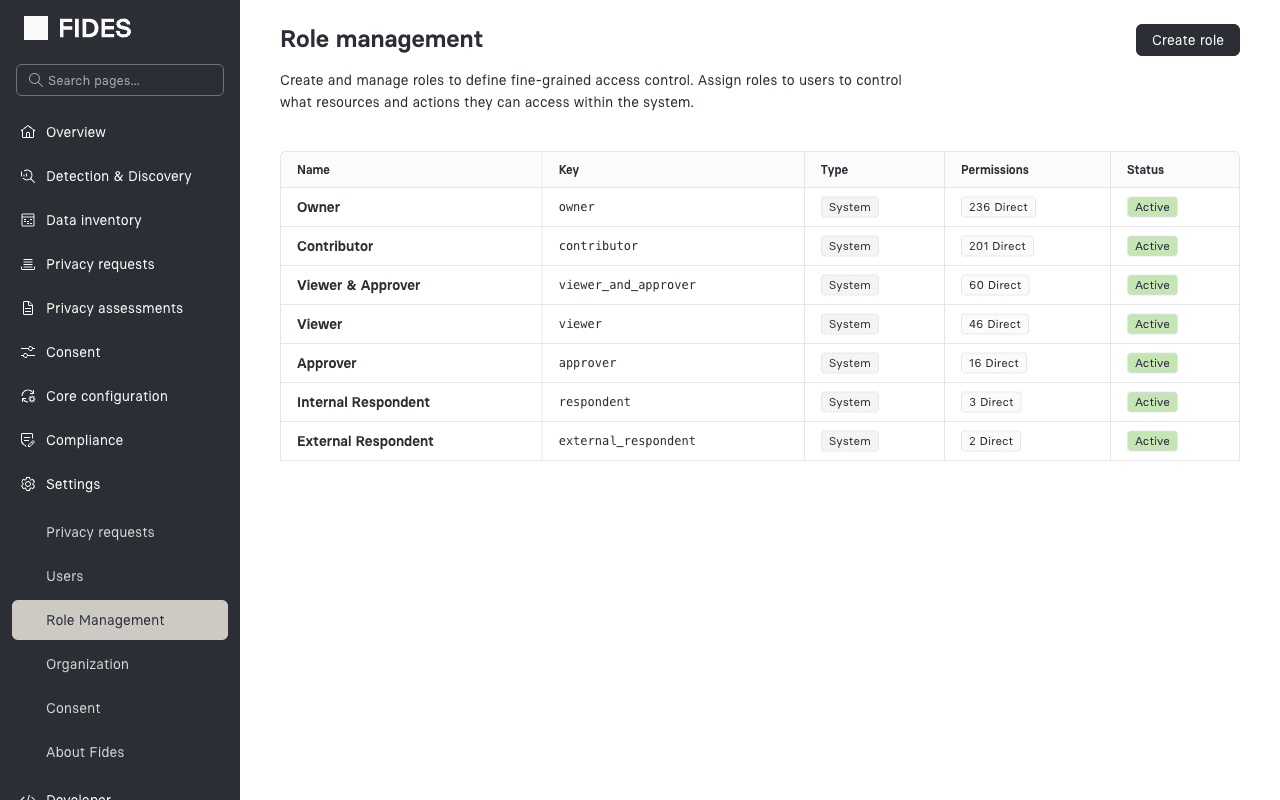
When Advanced RBAC is enabled, the Settings > Role Management page becomes available in the admin UI. From this page you can:
- View all system and custom roles
- Create new custom roles
- Edit role details and permissions
- View and manage user role assignments
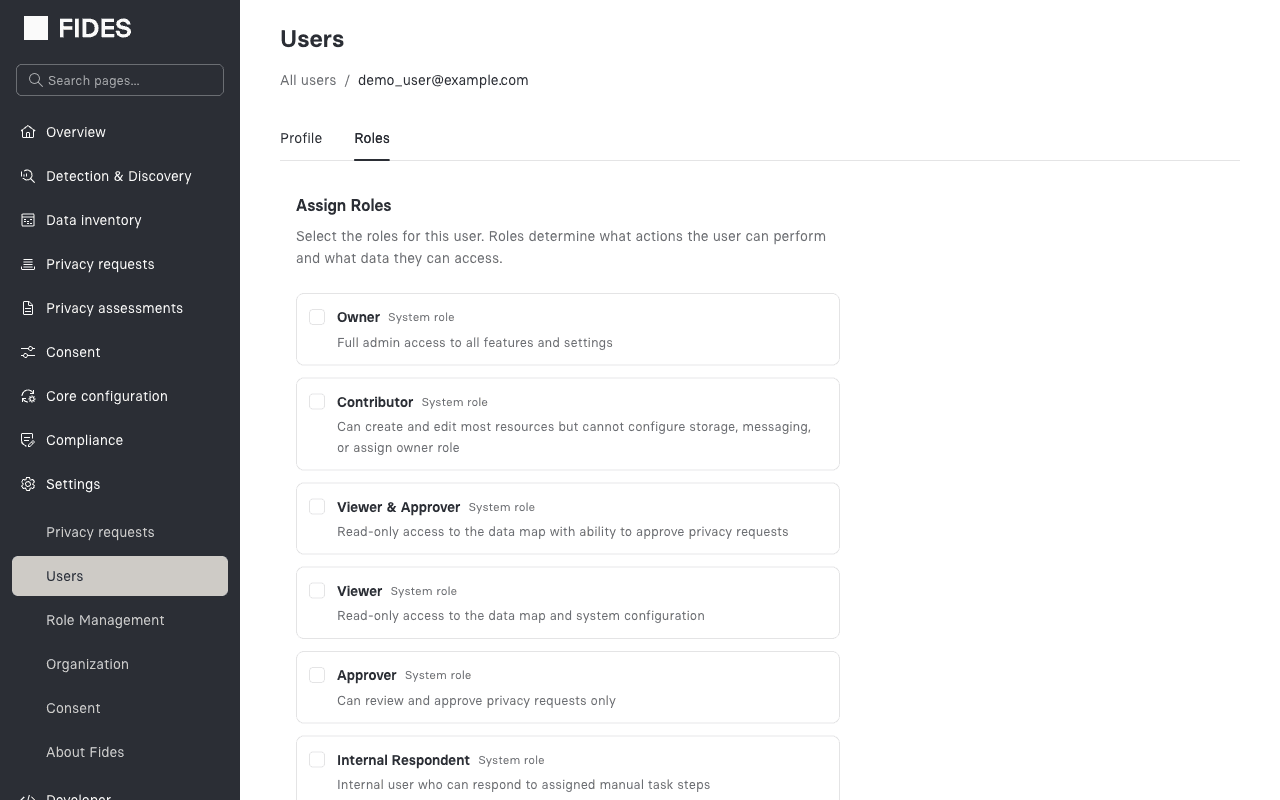
The user management pages also update to support the new system, showing card-based role selection with support for multiple role assignments per user.
Configuration reference
| Environment variable | Default | Description |
|---|---|---|
FIDESPLUS__RBAC__ENABLED | false | Enable the Advanced RBAC system. When false, uses the standard fixed-role system. |
FIDESPLUS__RBAC__ENFORCE_SOD_CONSTRAINTS | true | Enforce separation of duties constraints when assigning roles. |