Data mapping annotations
Data mapping annotations categorize user and system data, permitting Astralis to access or delete user data for a DSR.
Fides data categories
To handle privacy requests, Astralis needs to know how to find and process categories of personal data. By relating data fields to Fides data categories, Astralis can identify where personal data sits in your data architecture.
For example, if a data subject submits a request to have their personal data removed, Astralis has to know where to find categories of personal data like user contact info, demographic info, or purchase history.
Moreover, if a table contains fields with user contact data, annotating it with the label user.contact from the Fides Ontology (opens in a new tab) instructs Astralis to treat this information as contact information.
Annotating through the UI
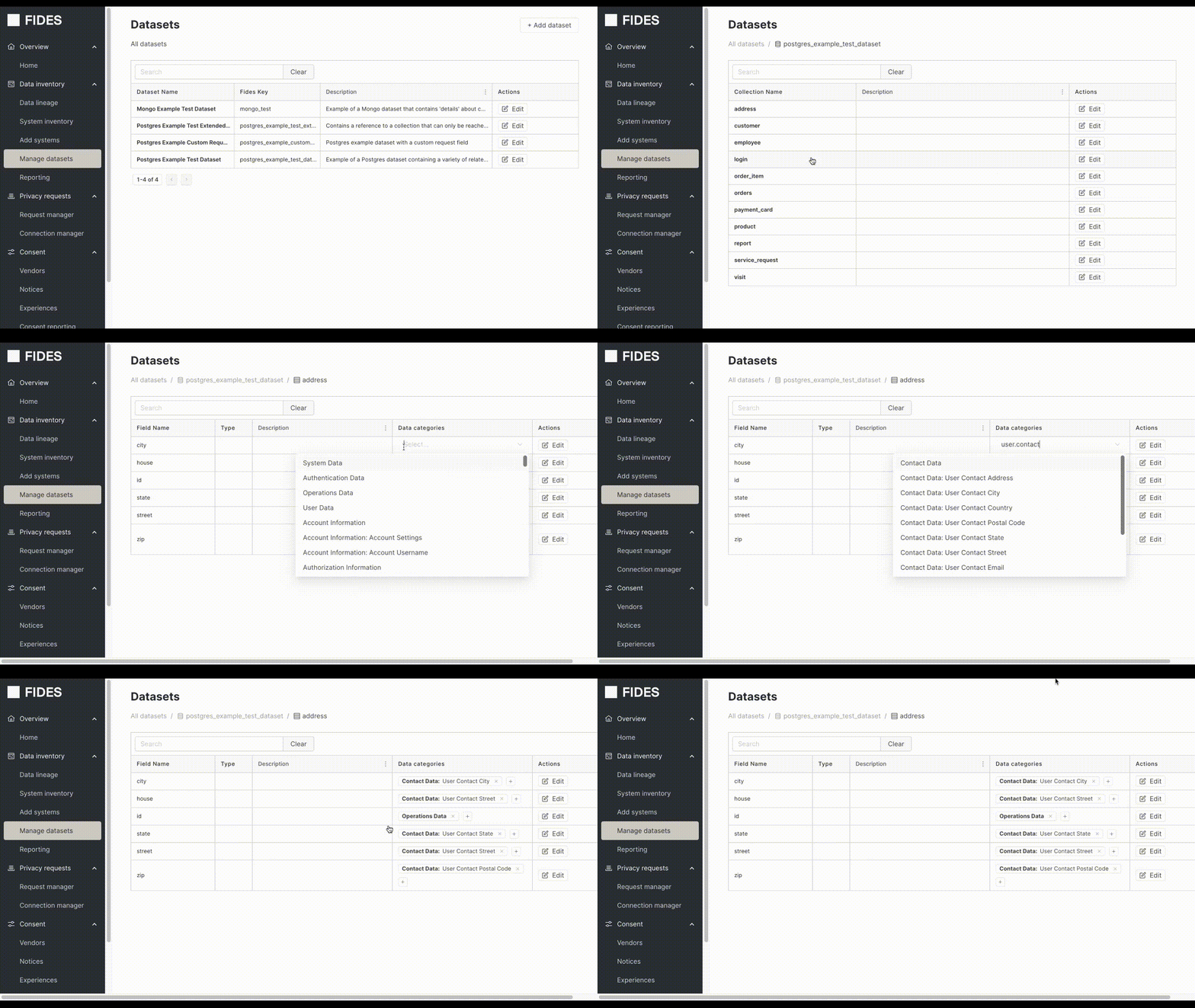
Within the Manage Datasets page, navigate to a dataset field, and click the plus button next to the field you want to annotate.
Annotating through the CLI
The fides annotate command provides an interactive command line prompt to annotate a dataset.
$ fides annotate dataset .fides/<your_dataset>.yaml
> Loaded config from: /fides/.fides/fides.toml
####
Annotating Dataset: [sample_dataset]
####
Annotating Table: [user]

Field [user.id] has no data categories

Enter comma separated data categories for [id] [s: skip, q: quit]:
The on screen prompts will walk you through the annotation process, allowing for you to save state if you do not complete the annotations in a single session so that you can return and complete later.
...
Enter comma separated data categories for [id] [s: skip, q: quit]: system.operations
Setting data categories for user.id to:
            ['system.operations']

Annotation process complete.
Additional information for the fides annotate command can be found in the CLI guide.
Annotating with YAML
You can specify the data category for each field of a collection in an Astralis dataset by adding a data_categories key to the field.
The following example describes a table called customer within a database called postgres_example_dataset. This table has the fields id, email, name which have been appropriately labeled for privacy request processing.
collections:
  - name: customer
    fields:
    - name: email
      data_categories:          # Add data categories section
      - user.contact.email      # Specify the data category (in this case email)
    - name: id
      data_categories:
      - user.unique_id
      fides_meta:
        primary_key: True
    - name: name
      data_categories:
      - user.name
      fides_meta:
        data_type: string
        length: 40