Custom Roles
Custom roles require Advanced RBAC to be enabled.
Custom roles allow you to define permission sets tailored to your organization's structure and workflows. Unlike the built-in system roles, custom roles can be freely created, modified, and deleted.
System roles vs. custom roles
| System roles | Custom roles | |
|---|---|---|
| Created by | Astralis (seeded automatically) | Administrators |
| Permissions | Fixed, cannot be modified | Fully configurable |
| Deletable | No | Yes (if no active user assignments) |
| Editable fields | Description and active status only | All fields |
Creating a custom role
From the UI
- Navigate to Settings > Role Management
- Click Create role
- Fill in the role details:
- Name: A human-readable display name (e.g., "Data Steward")
- Key: A machine-readable identifier, auto-generated from the name (e.g.,
data_steward). Must be unique and use only lowercase letters, numbers, and underscores. - Description: An explanation of the role's purpose
- Parent role (optional): Select a role to inherit permissions from
- Priority: A value from 0-100 that determines precedence when a user holds multiple roles. Higher values take priority.
- Click Create role
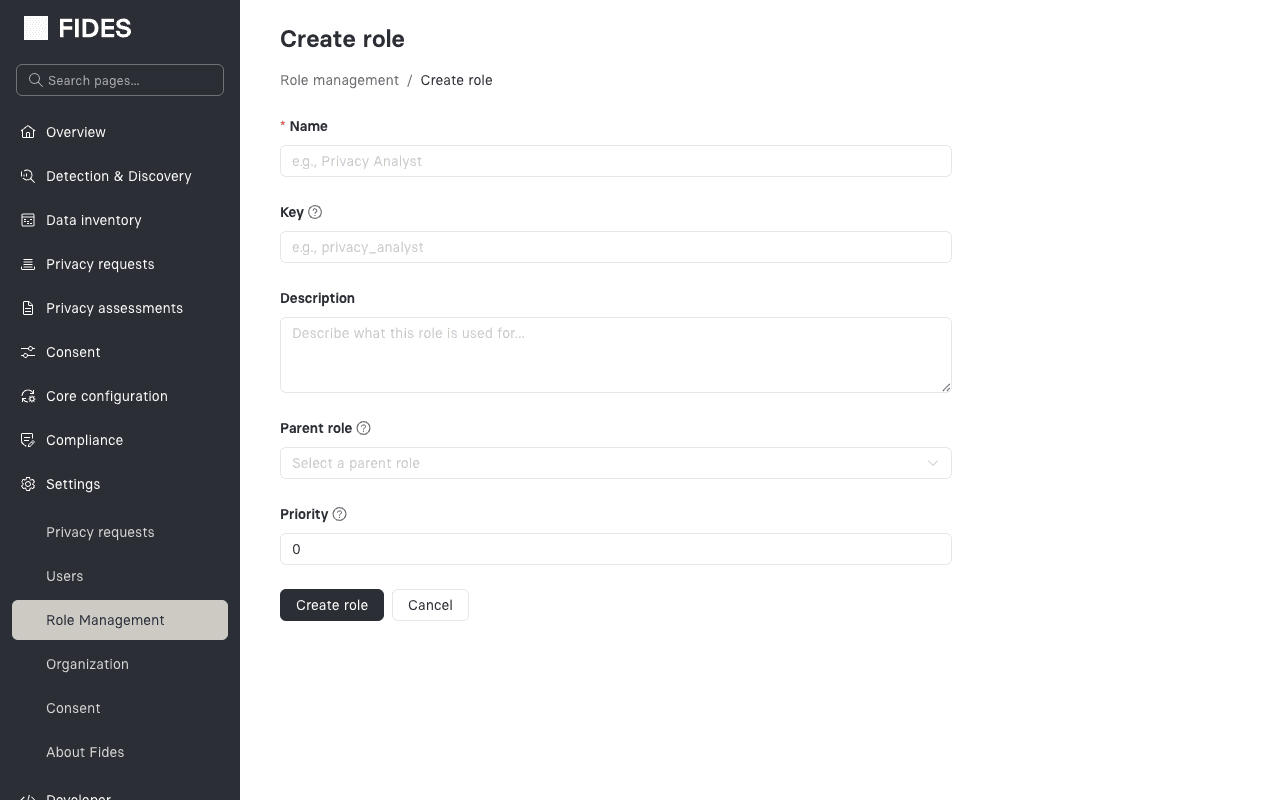
After creation, you'll be taken to the role detail page where you can configure permissions.
From the API
curl -X POST https://your-fides-instance/api/v1/plus/rbac/roles \
  -H "Authorization: Bearer $TOKEN" \
  -H "Content-Type: application/json" \
  -d '{
    "name": "Data Steward",
    "key": "data_steward",
    "description": "Manages data classification and discovery",
    "parent_role_id": null,
    "priority": 60
  }'
Configuring permissions
From the UI
On the role detail page, the Permissions section displays all available permissions organized by resource type. Each permission has a checkbox to toggle it on or off.
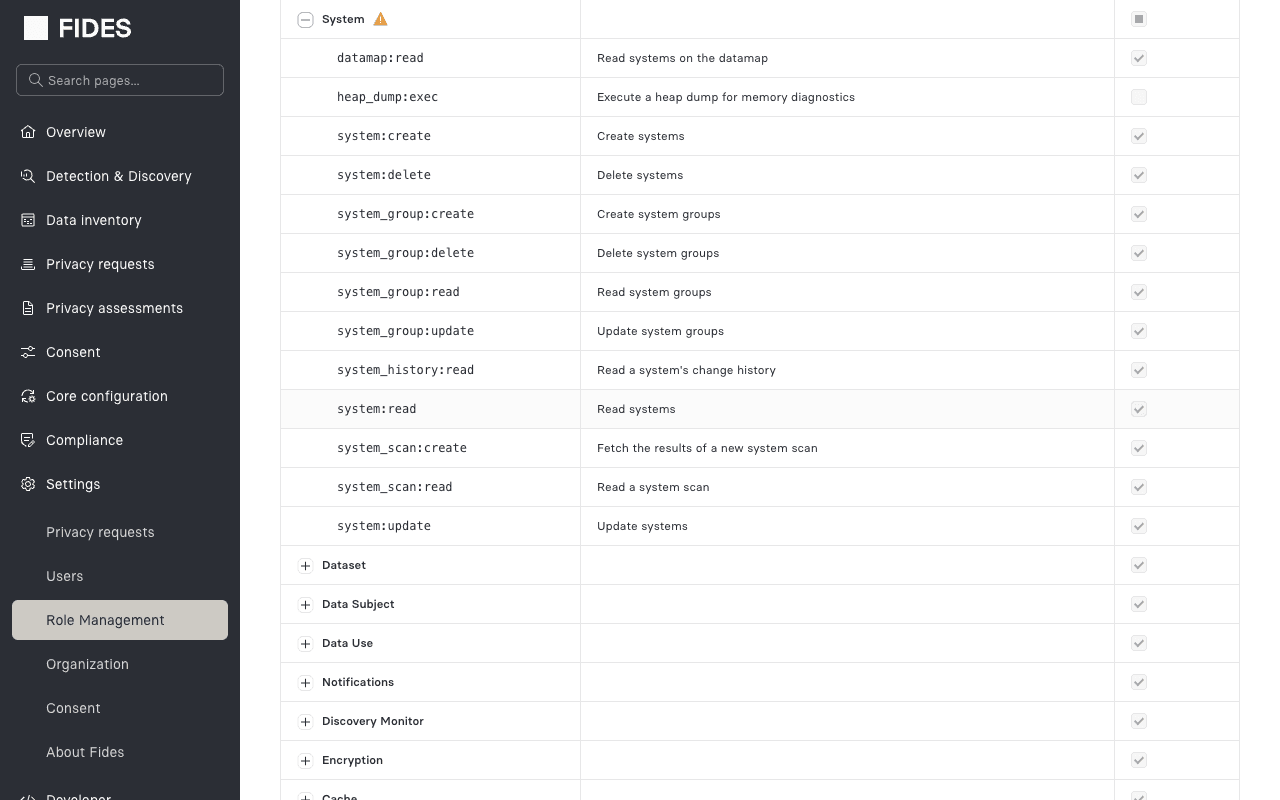
- Permissions are grouped by resource type (e.g., System, Privacy Request, User)
- Use the search bar to filter permissions by name or description
- Group-level checkboxes select or deselect all permissions within a resource type
- For roles with a parent, inherited permissions are shown but cannot be unchecked
To check what a given permission will make visible in the admin UI before you select it, see Permissions by UI Location.
System role permissions cannot be modified through the UI or API. Only custom roles support permission editing.
From the API
To set the permissions for a custom role, provide the complete list of permission codes. This replaces all existing permissions on the role.
curl -X PUT https://your-fides-instance/api/v1/plus/rbac/roles/{role_id}/permissions \
  -H "Authorization: Bearer $TOKEN" \
  -H "Content-Type: application/json" \
  -d '{
    "permission_codes": [
      "system:read",
      "system:update",
      "privacy-request:read",
      "privacy-request:review"
    ]
  }'
Role hierarchy
Setting a parent role creates an inheritance relationship. The child role receives all of the parent's permissions in addition to its own directly assigned permissions.
Example hierarchy:
Viewer (system role)
  └── Data Steward (custom role)
        Inherits: system:read, privacy-request:read, ...
        Adds: classification:read, classification:update, discovery:read
Things to keep in mind:
- A role can have at most one parent
- Circular hierarchies are not allowed (A cannot inherit from B if B already inherits from A)
- Changes to a parent role's permissions automatically propagate to child roles
- Inherited permissions cannot be individually removed from the child role
Editing a role
From the UI
- Navigate to Settings > Role Management
- Click on the role name to open the detail page
- Modify the desired fields and click Save
For system roles, only the description and active status can be changed.
From the API
curl -X PUT https://your-fides-instance/api/v1/plus/rbac/roles/{role_id} \
  -H "Authorization: Bearer $TOKEN" \
  -H "Content-Type: application/json" \
  -d '{
    "name": "Updated Role Name",
    "description": "Updated description",
    "is_active": true
  }'
Deactivating and deleting roles
Deactivating a role sets it to inactive. Inactive roles are excluded from permission evaluation, effectively revoking access for all users assigned to that role without removing the assignments.
Deleting a role permanently removes it. A role can only be deleted if:
- It is not a system role
- It has no active user assignments
To remove a role that has active assignments, first reassign those users to a different role.
From the API
# Delete a custom role
curl -X DELETE https://your-fides-instance/api/v1/plus/rbac/roles/{role_id} \
  -H "Authorization: Bearer $TOKEN"
Example: building an organizational role structure
Here's an example of how you might structure custom roles for a privacy team:
| Role | Parent | Additional permissions | Use case |
|---|---|---|---|
| Privacy Analyst | Viewer | privacy-request:read, privacy-request:review | Reviews and processes DSR requests |
| Data Steward | Viewer | system:update, classification:read | Manages system data maps |
| Privacy Admin | Contributor | rbac_role:read, rbac_user_role:create | Manages team access and roles |