Managing privacy requests
The Request Manager is the Astralis Admin UI workspace where you review privacy requests after they are submitted: approve or deny them, extend their response deadlines, and track their progress to completion.
The data subject's location determines the regulation that applies and with it, the time limit for when a privacy request must be completed. This table describes the timeframes for common privacy regulations, and the extension each one allows:
| Regulation | Timeframe | Extension |
|---|---|---|
| GDPR (EEA) | 28 days (one calendar month) | Up to 60 further days |
| UK GDPR | 28 days (one calendar month) | Up to 60 further days |
| US state regulations | 45 days | Up to 45 further days (90 total) |
| FDBR (Florida) | 45 days | Up to 15 further days |
| PIPEDA (Canada) | 30 days | Up to 30 further days |
| Law 25 (Quebec) | 30 days | None available to a reviewer |
| LGPD (Brazil) | 15 days | None available to a reviewer |
Exceptions
There are some situations where you may not be able to, or required to, complete a privacy request. It's important to know when these might apply and how to manage them. In each case you should evaluate the circumstances and risks for your specific organization to ensure you're complying at all times.
Legal obligation
There are certain categories of personal data that you may be required to retain in order to fulfill legal or compliance obligations. In such cases, you're permitted to retain that data in the event when an erasure request is received- provided you restrict the use of the data to that purpose.
Confidentiality risk
In circumstances where returning data to a subject might reveal confidential or sensitive information about any organization or another individual, you're not required to return that specific piece of information.
Privacy request statuses
Each privacy request is assigned a status that reflects its current stage in the workflow:
| Status | Description |
|---|---|
| Identity Unverified | Request received from a user, but they have not completed the identity verification flow via email or SMS. |
| Pending | Request is ready for processing (verification complete or not required), but is awaiting approval or rejection in the Astralis Admin UI. |
| Approved | Request has been approved in Astralis (either automatically, or via the Admin UI) and will be enqueued for processing as soon as possible. |
| Denied | Request has been denied in Astralis and the user has been notified. No further action required. |
| In Processing | Request was approved and has begun processing by executing all configured integrations. |
| Requires Input | Request began processing and is currently waiting for data to be manually input via the Astralis Admin UI. |
| Paused | Request began processing but was paused by a policy webhook and is waiting to be resumed via a webhook. |
| Awaiting Email Send | Request began processing and is currently waiting for the next scheduled batch email send (weekly). |
| Awaiting Access Review | Access request has finished collecting results and is being held for a human to review, redact, and approve the access package before delivery. |
| Complete | Request has completed all configured integrations, uploaded results to storage, and notified the user. |
| Requires Manual Finalization | Request has completed automated processing but requires manual finalization before it can be marked complete. |
| Pending External | Request is awaiting action from an external system, such as a Jira ticket. |
| Duplicate | Request has been identified as a duplicate of another privacy request. |
| Awaiting Pre-Approval | Request is awaiting responses from external pre-approval webhooks before it can proceed. See Pre-Approval Webhooks. |
| Pre-Approval Not Eligible | Pre-approval webhook(s) responded that the request is not eligible for automatic approval; manual review is required. |
| Canceled | Request was canceled via the Data Right Protocol (DRP) API. |
| Error | Request began processing and encountered an error in one or more integrations. |
Review privacy requests
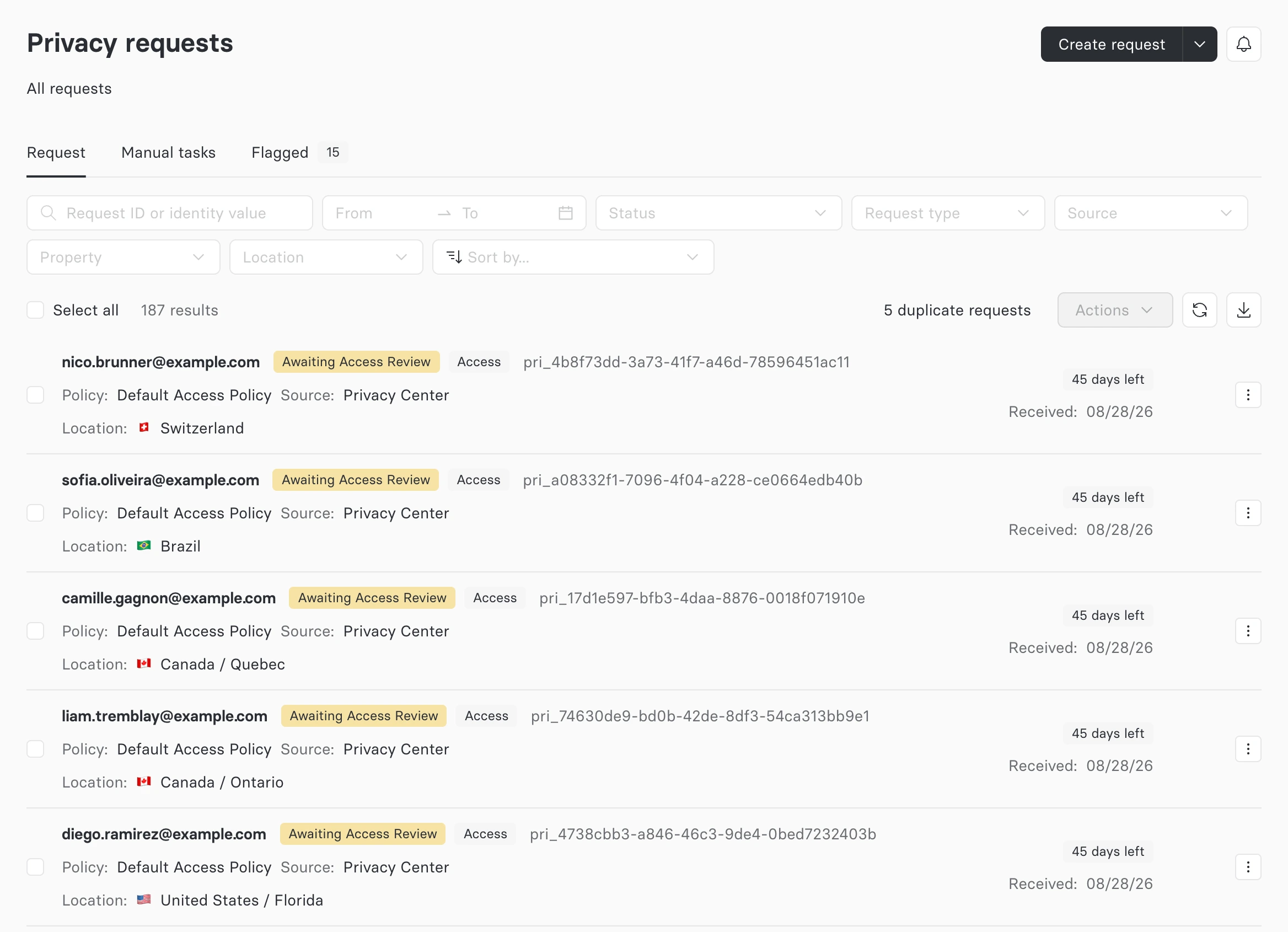
When privacy requests are received, they're registered in Astralis as a New request available to view in the Request Manager. Each row shows the subject's identity, the request's status and type, the policy and source it came from, and the location it was submitted under — the location being what determines the response deadline and any extension allowance:
Approve or deny a request
A request awaiting review can be approved or denied from two places: inline on its row in the Request Manager, or from the Actions menu on the request's details page.
On a row, the tick approves the request and the cross denies it. Both appear only while the request is in a status that can still be reviewed:

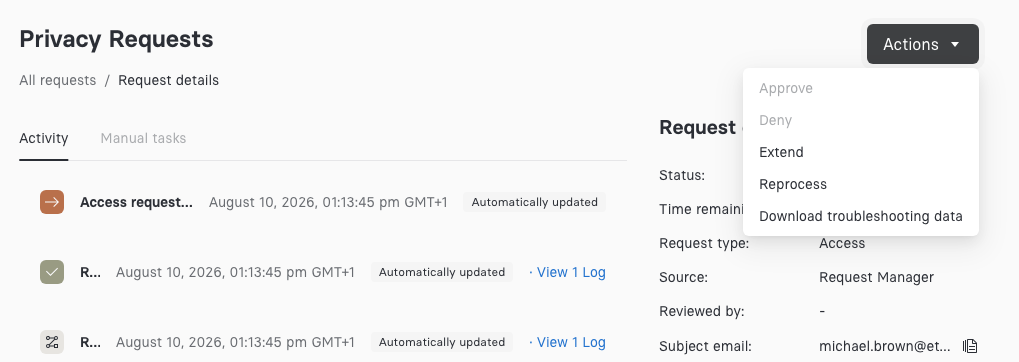
On the details page the same two actions are named in the Actions menu, alongside Extend and the other per-request operations:
If access package review is enabled, completed access requests are held in the Awaiting Access Review status so a reviewer can inspect the results and redact fields before anything is delivered to the subject. See Access Packages.
If the request type asks for documents, the approval dialog warns you when they haven't been verified. See Review documents.
Rejecting a request
After approval, the privacy request is processed using the configured Privacy Request Policy. When the request is complete, the data subject will be notified by email. If the request is an access request, the confirmation email will include a download link to retrieve a copy of their personal data.
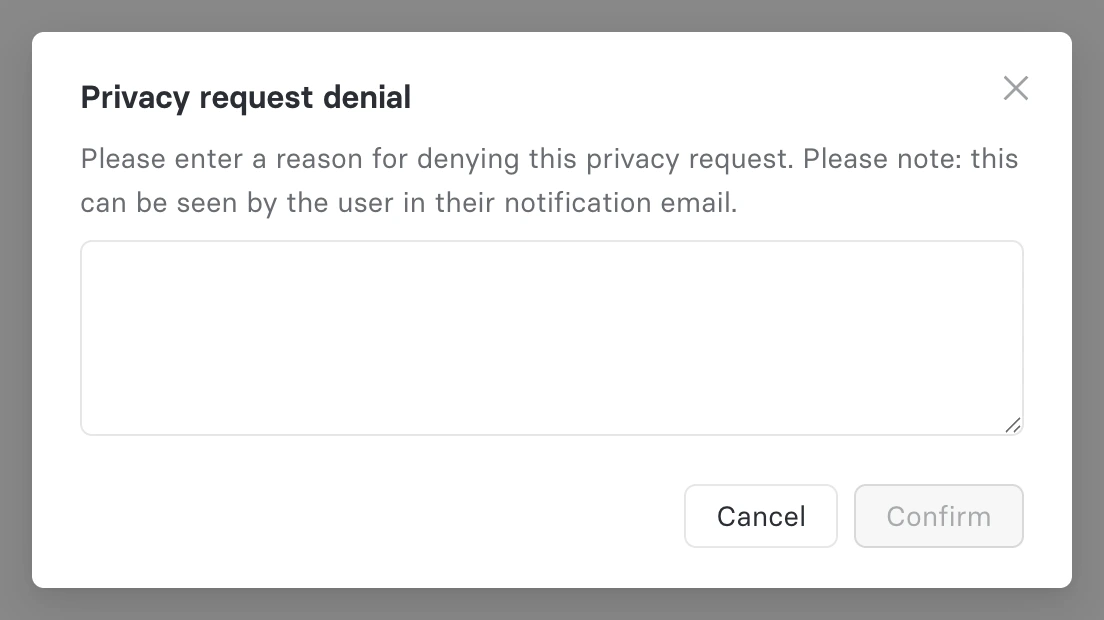
When denying a request, you'll be prompted for a reason. That reason is stored in the Astralis audit trail for reporting purposes, and is shown to the subject in their notification email:
Extend a request
Sometimes a request needs more time than its standard response window allows. You can extend a request's response deadline by a set number of days, along with a required reason for the extension. The Extend action is available for any request that has a due date and hasn't reached a completed, denied, or canceled status. Consent requests, which have no due date, can't be extended.
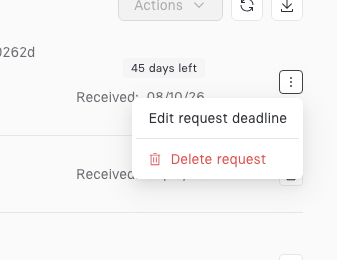
To extend a request from the Request Manager, hover over the kebab menu ... for the request. If the request can also be deleted, the two actions are combined into a single More actions menu, with the extend option labeled Edit request deadline:
To extend a request from the request details page, open the Actions menu and select Extend:
Either path opens the same dialog. Enter the number of days to extend the deadline by, and a reason for the extension:
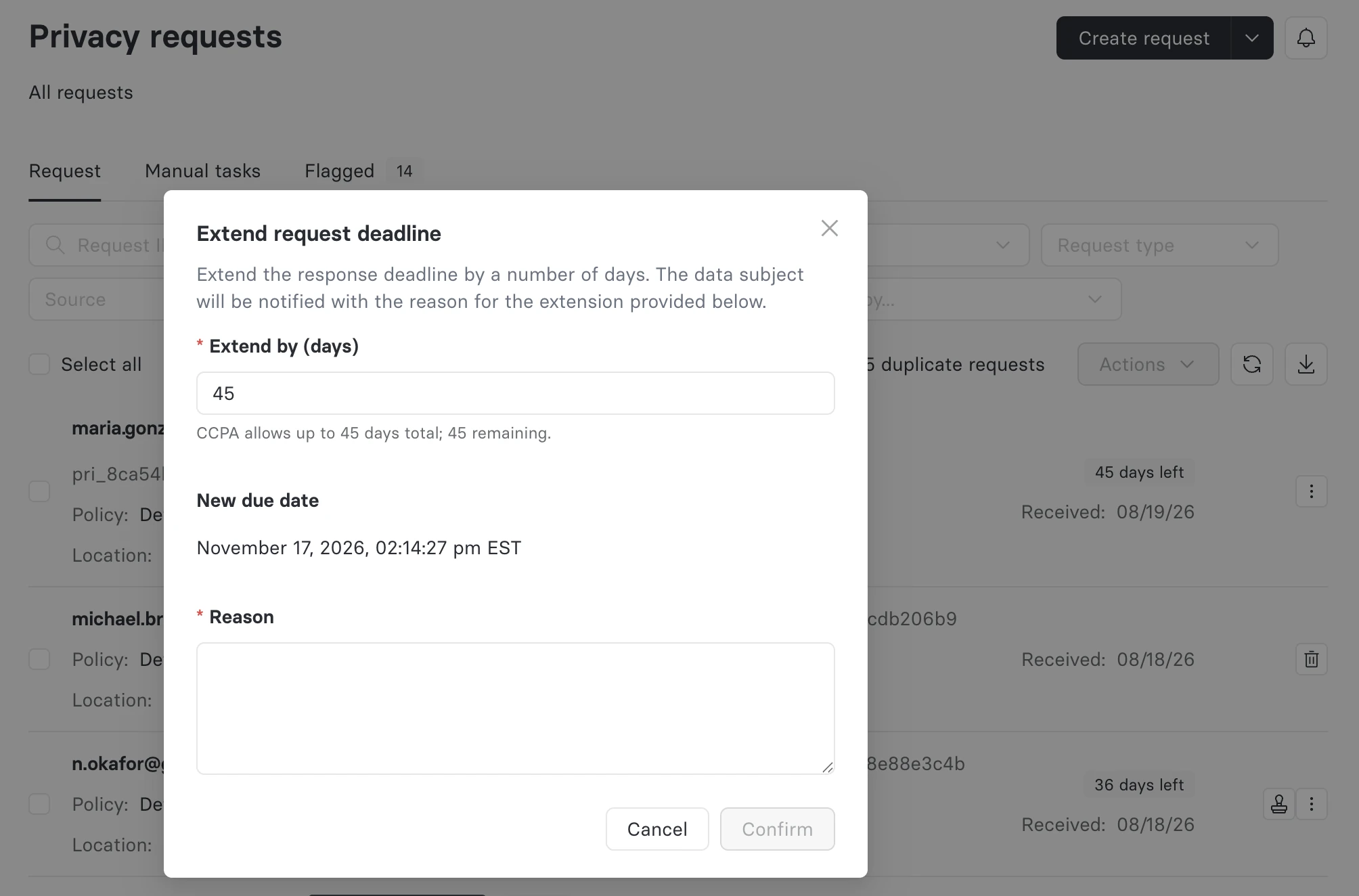
Understand extension limits
Requests cannot be re-extended, and certain regulations, like Brazil's LGPD, do not permit extensions.
The reason you provide is required, and is included in the notification email sent to the data subject if the deadline extension notification setting is enabled for your environment.
You'll also see a warning — though you can still proceed — if the request is already past its original response deadline.
Once confirmed, the new due date takes effect immediately, and an Extended tag appears next to the request on its details page:
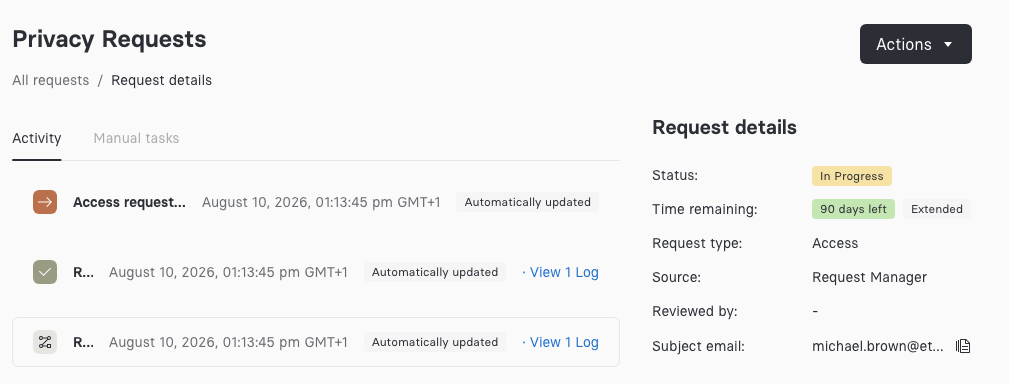
Every extension is recorded in the request's audit trail.
View request details
To open a request, click it in the Request Manager. The details page shows:
- Request ID: The unique ID for the privacy request.
- Request type: The privacy request type, such as access or erasure.
- Policy key: The privacy request policy being applied to the privacy request.
- Status and time remaining: The current status, and how long is left to complete the request.
- Source and location: Where the request came from, and the jurisdiction it was submitted under.
- Subject email: The identity the request was made for.
- Activity: A log of everything that has happened to the request, where you can also add a comment.
The details page has a tab for each part of the review.
| Tab | What it holds |
|---|---|
| Activity | The request's comments, then a log of everything that has happened to it, newest first |
| Documents | Every document the data subject and your team provided. See Review documents. |
| Manual tasks | The tasks your team completes for the request |
| Access package | The access package, while it waits for review. Shown when access package review is enabled. |
A dot on a tab means it needs your attention: documents from the data subject that haven't been verified, a request in Requires input on Manual tasks, or a request in Awaiting access review on Access package. Clicking the status in the Request details panel opens the tab it refers to.
Each tab has its own address. Add ?tab=activity, ?tab=documents, ?tab=manual-tasks, or ?tab=access-package to a request's address to share a link that opens on that tab.
Comment on a request
Comments let your team discuss a request on the request itself. They're internal and are never sent to the data subject.
The Comments pane sits at the top of the Activity tab, above the activity log. It shows the three newest comments and any older comment that mentions you. Click Show all N comments to see the rest.
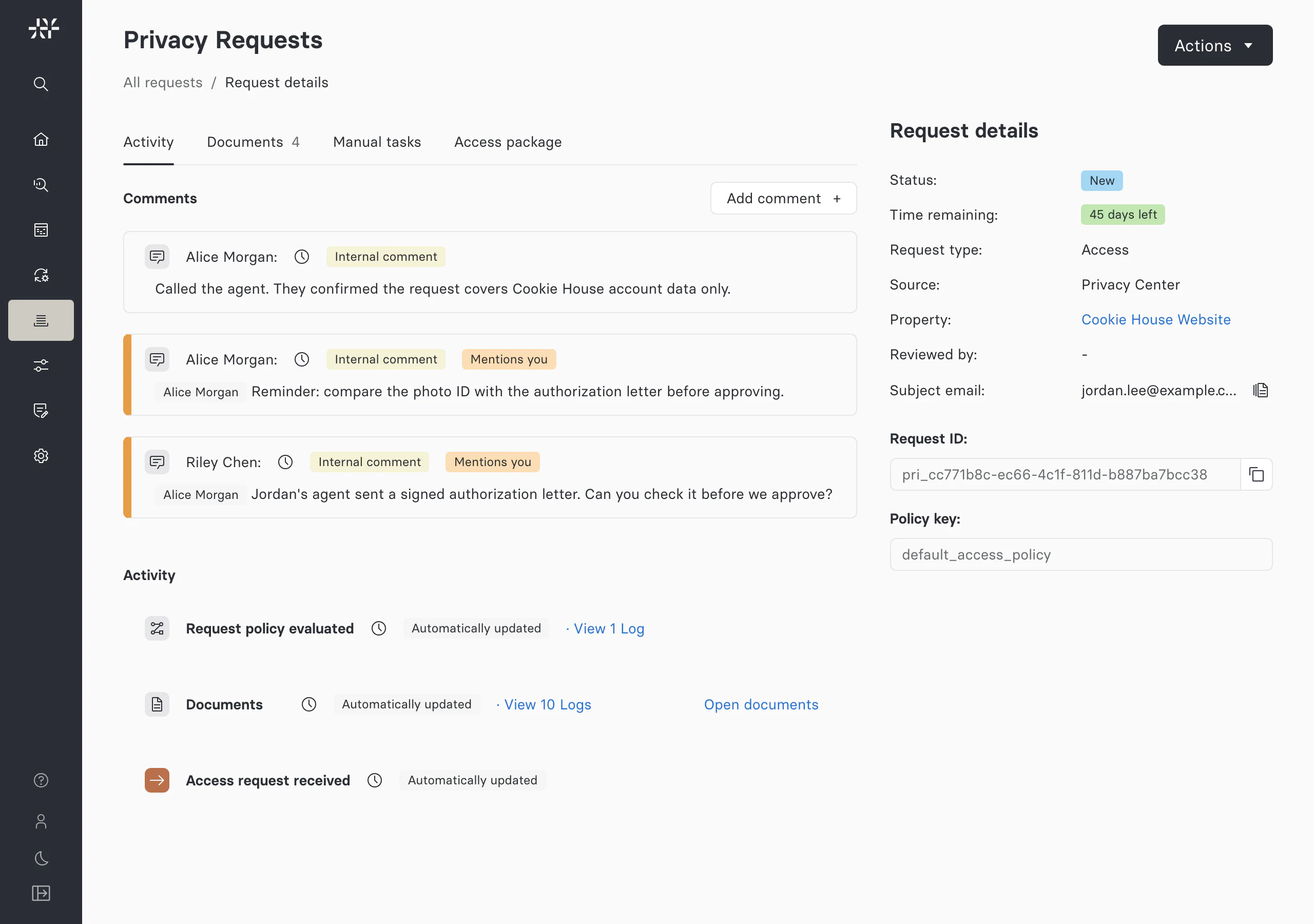
To add a comment:
- On the Activity tab, click Add comment +.
- Write your comment. To mention a colleague, type
@followed by their username and pick them from the list. - Click Save.
Comments can't be edited or deleted after you save them.
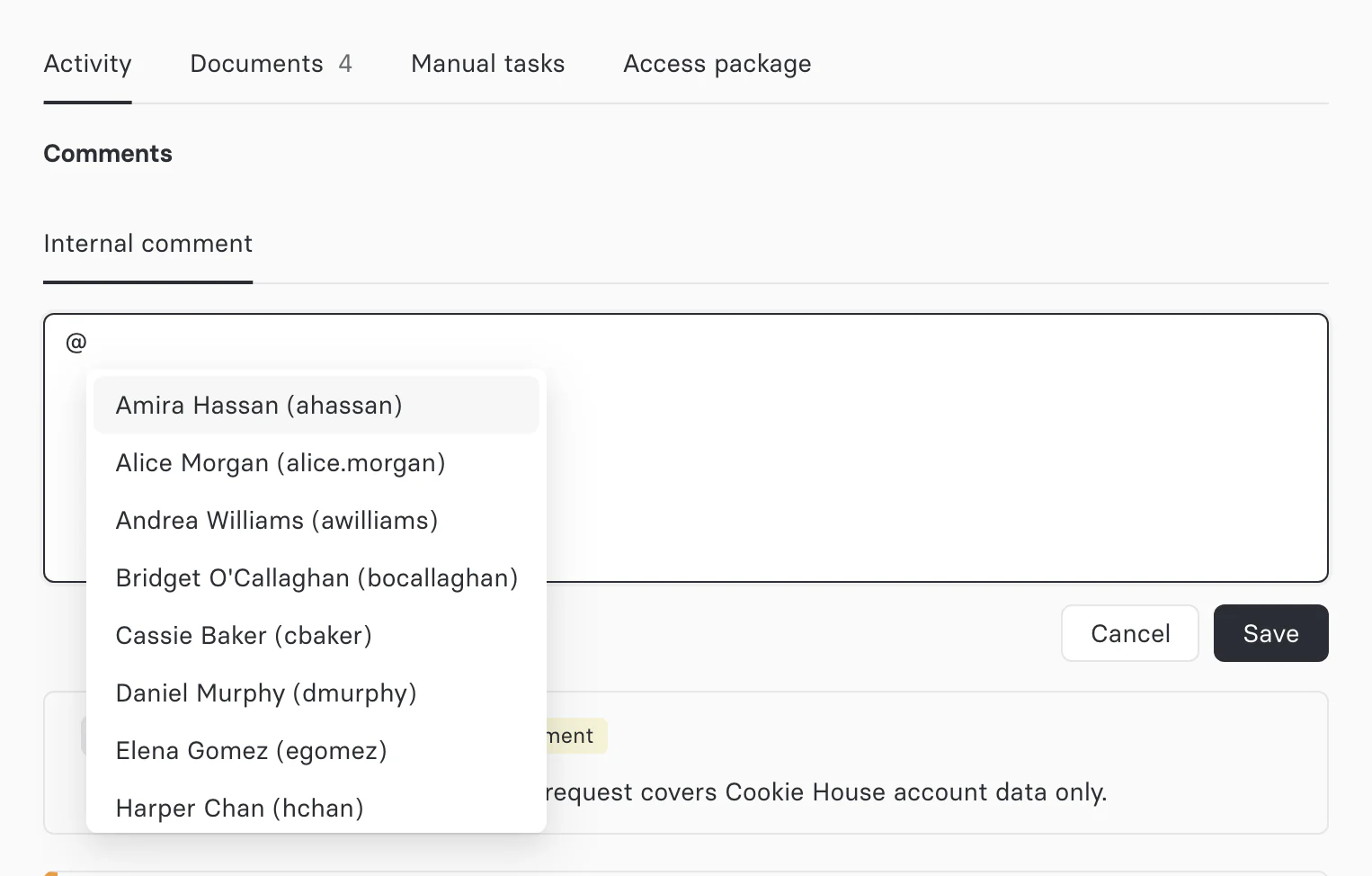
Mention a colleague
You can mention anyone who can view the request. A mention appears as a tag with the person's name, and the comment shows Mentions you when they open the request. Astralis also emails them the comment with a link to the request, using the Privacy request comment mention template. Mention emails need an email messaging provider and the Admin UI URL. With property-specific messaging, the template must also be enabled for the request's property.
To leave yourself a reminder, mention yourself. The comment stays in view in the pane as newer comments arrive, and you get the email too.
Adding a comment needs the comment:create permission, and reading comments needs comment:read. To search for colleagues to mention, you also need user:read.
Filter and search requests
Requests can be filtered by status, request type, source, property, and location, or narrowed to a date range. The same bar searches by request ID or identity value, and sorts the result set:

Download reports
The toolbar above the list reports how many requests match the current filters, and offers bulk actions for the ones you select. To download a report of the currently filtered view, click the download button on the right:
