User Role Assignments
Advanced role assignment features (multiple roles, resource scoping, temporal access) require Advanced RBAC to be enabled.
User role assignments connect users to roles, determining what each person can access and do within Astralis. With Advanced RBAC enabled, assignments can be scoped to specific resources and limited to specific time windows.
Assigning roles to users
From the UI
- Navigate to Settings > Users
- Select the user you want to manage
- On the Permissions tab, select one or more roles using the role cards
- Click Save
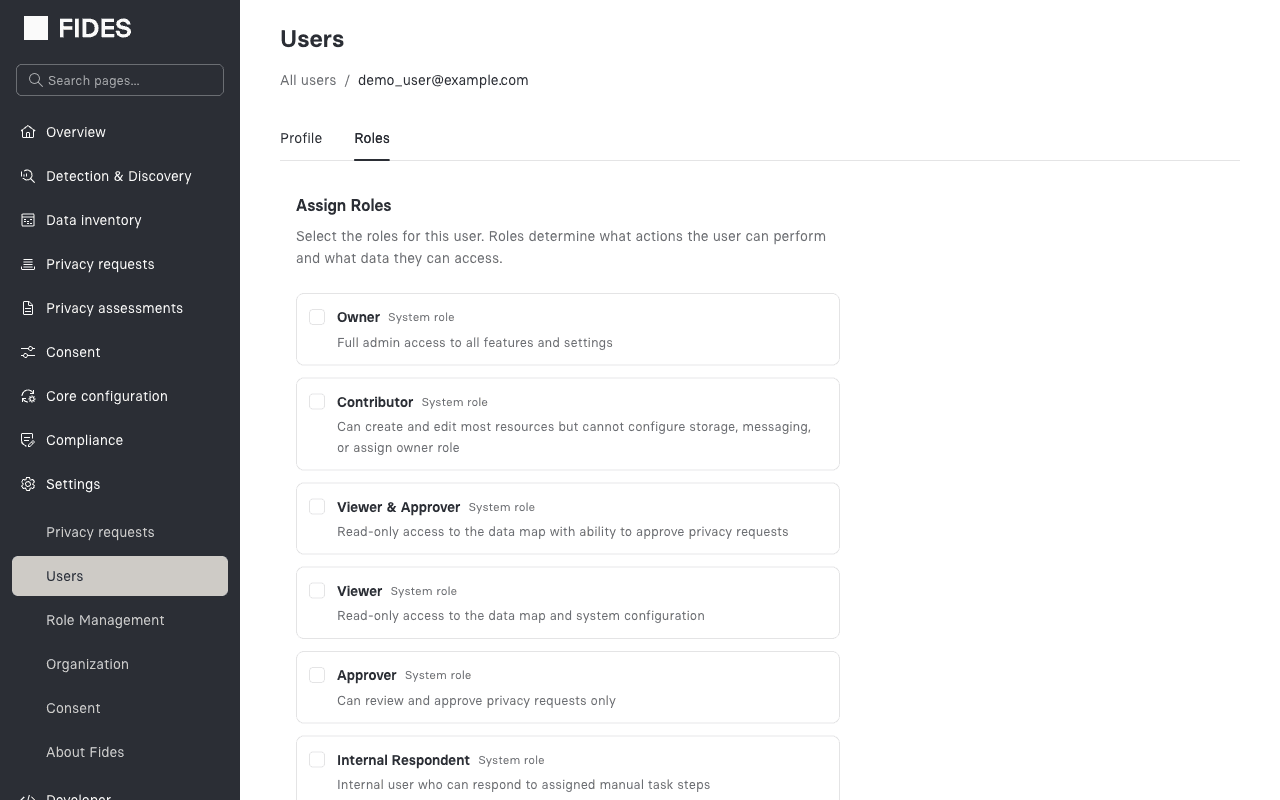
With Advanced RBAC enabled, users can hold multiple roles simultaneously. The effective permissions are the union of all permissions from all assigned roles.
From the API
curl -X POST "https://your-fides-instance/api/v1/plus/rbac/user-roles?user_id={user_id}" \
  -H "Authorization: Bearer $TOKEN" \
  -H "Content-Type: application/json" \
  -d '{
    "role_id": "role-uuid"
  }'
Removing a role assignment
curl -X DELETE "https://your-fides-instance/api/v1/plus/rbac/user-roles/{user_id}/{assignment_id}" \
  -H "Authorization: Bearer $TOKEN"
Resource scoping
Role assignments can be scoped to limit their effect to specific resource types or individual resources. This is useful when you want a user to have elevated permissions for certain systems without granting them broad access.
Scoping levels
| Scope | resource_type | resource_id | Effect |
|---|---|---|---|
| Global | null | null | Permissions apply to all resources |
| Type-level | e.g., "system" | null | Permissions apply to all resources of that type |
| Instance-level | e.g., "system" | "system-uuid" | Permissions apply only to the specific resource |
Example: scoped assignment via the API
# Grant "Contributor" role scoped to a specific system
curl -X POST "https://your-fides-instance/api/v1/plus/rbac/user-roles?user_id={user_id}" \
  -H "Authorization: Bearer $TOKEN" \
  -H "Content-Type: application/json" \
  -d '{
    "role_id": "contributor-role-uuid",
    "resource_type": "system",
    "resource_id": "my-system-uuid"
  }'
This user would have Contributor-level permissions only for the specified system, while their other role assignments determine their access to everything else.
Some permissions are inherently global and cannot be meaningfully scoped to individual resources. For example, system:create applies globally because the target system doesn't exist yet at the time of the check.
Temporal access (time-limited roles)
Role assignments can include a validity window defined by valid_from and valid_until timestamps. This is useful for granting temporary access that automatically expires without requiring manual cleanup.
Use cases
- Contractor access: Grant a role that expires at the end of a contract period
- Incident response: Temporarily elevate permissions during an active incident
- Scheduled access: Pre-schedule a role to activate on a future date
Example: temporal assignment via the API
# Grant temporary "Contributor" access for Q1 2026
curl -X POST "https://your-fides-instance/api/v1/plus/rbac/user-roles?user_id={user_id}" \
  -H "Authorization: Bearer $TOKEN" \
  -H "Content-Type: application/json" \
  -d '{
    "role_id": "contributor-role-uuid",
    "valid_from": "2026-01-01T00:00:00Z",
    "valid_until": "2026-03-31T23:59:59Z"
  }'
Behavior:
- If only
valid_fromis set, the assignment activates at that time and never expires - If only
valid_untilis set, the assignment is active immediately and expires at that time - If both are set, the assignment is active only within the specified window
- If neither is set, the assignment is active indefinitely
- Expired assignments are excluded from permission evaluation but remain in the database for audit purposes
Viewing a user's roles
From the API
# List active role assignments for a user
curl "https://your-fides-instance/api/v1/plus/rbac/user-roles?user_id={user_id}" \
  -H "Authorization: Bearer $TOKEN"

# Include expired assignments
curl "https://your-fides-instance/api/v1/plus/rbac/user-roles?user_id={user_id}&include_expired=true" \
  -H "Authorization: Bearer $TOKEN"
The response includes the role details, resource scoping, validity window, and whether the assignment is currently active.
Viewing your own permissions
Any authenticated user can view their own effective permissions without needing any specific RBAC scope:
curl https://your-fides-instance/api/v1/plus/rbac/me/permissions \
  -H "Authorization: Bearer $TOKEN"
This returns a flat list of permission codes representing the union of all permissions from the user's active role assignments, including inherited permissions.
Evaluating permissions (admin)
Administrators can check whether a specific user has a particular permission, including the reason and how it was matched:
curl -X POST https://your-fides-instance/api/v1/plus/rbac/evaluate \
  -H "Authorization: Bearer $TOKEN" \
  -H "Content-Type: application/json" \
  -d '{
    "user_id": "user-uuid",
    "permission_code": "system:update",
    "resource_type": "system",
    "resource_id": "specific-system-uuid"
  }'
Response:
{
  "has_permission": true,
  "reason": "Permission granted via role 'Contributor'",
  "evaluated_roles": ["contributor", "viewer"],
  "matched_via": "direct"
}
The matched_via field indicates how the permission was resolved:
direct— the permission is directly assigned to one of the user's rolesinherited— the permission comes from a parent role in the hierarchynull— the permission was not granted