Feature Flags
Feature flags control access to new Astralis capabilities while they are being rolled out. Each flag gates a new feature (typically in beta) and lets you turn that feature on or off for your entire Astralis deployment without a new release.
Flags are temporary by design: a flag accompanies a feature from beta through general availability, and is removed once the feature is fully released. The set of available flags therefore changes from release to release; the Settings > About Astralis page always shows the complete, current list for your deployment.
Managing flags in the UI
Navigate to Settings > About Astralis in the admin UI. The Beta features section lists every available flag with its name, description, and current value, along with a Search features box for narrowing a long list.
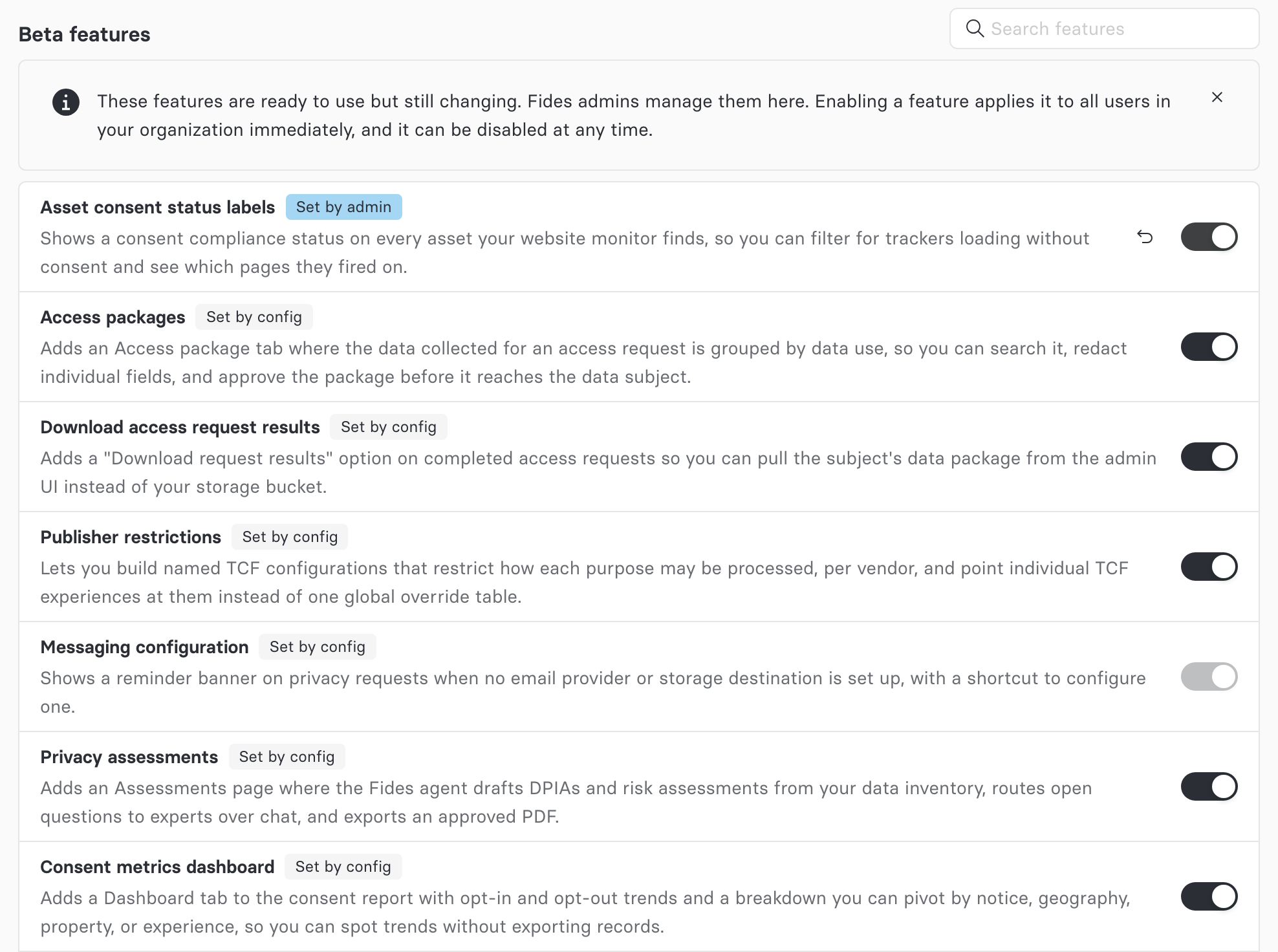
- Toggling a flag creates a deployment-wide admin override, which takes effect immediately for all users in your organization.
- Reset (the undo icon) removes the override, and the flag falls back to its configured or default value. The icon appears only on a flag that currently has an override to clear.
A toggle can also be locked, and hovering it explains why:
- You don't have permission to change it. Your role can read flags but not update them; an Astralis admin can make the change for you.
- Your deployment manages it. Some flags are deploy-managed and cannot be changed from the UI at all, even by an Owner.
Viewing the list requires the feature_flag:read permission, held by every role that can sign in to the admin UI: Owner, Contributor, Viewer, Viewer + Approver, Approver, Data Steward, and Internal Respondent. If your role does not include it, the section is hidden rather than shown as an error. Changing a flag requires feature_flag:update, held by the Owner and Contributor roles only.
Earlier versions of Astralis offered per-browser beta feature toggles on this same Settings > About Astralis page, stored in your browser. Those toggles have been replaced: the list looks similar, but a flag you change now applies to your whole deployment rather than to your own browser, and any values previously stored in a browser are ignored.
Alpha features
Some flags gate features that are still under active development and can be unstable. These are not listed on Settings > About Astralis. They remain settable through the API, and Ethyca support can direct you to them if you are taking part in an early preview.
How a flag's value is resolved
Each flag resolves to a value from the highest-priority source that is set:
| Priority | Source | Meaning |
|---|---|---|
| 1 | admin | An override set from Settings > About Astralis (or the API). Stored in the Astralis database. |
| 2 | config | A value provided at deploy time via an environment variable or fides.toml (see below). |
| 3 | default | The flag's built-in default for your Astralis version. |
The UI shows where a value came from as a tag next to the flag's name (Set by admin or Set by config) with the date an override was set. A flag with no tag is sitting at its built-in default because nobody has changed it. The API returns the same information in its source field.
Setting flags at deploy time
Every flag can be set through configuration, using an environment variable named after the flag:
FIDESPLUS__FEATURE_FLAGS__<FLAG_NAME>The flag name is upper snake case. For example, the assetConsentStatusLabels flag is controlled by:
FIDESPLUS__FEATURE_FLAGS__ASSET_CONSENT_STATUS_LABELS=trueAlternatively, set flags under the [feature_flags] section of your fides.toml configuration file. As with all Astralis configuration, the environment variable takes precedence over the TOML value.
Configuration is read once at startup, so adding, changing, or removing one of these values takes effect on the next restart. Admin overrides are not subject to that: setting or resetting one from the UI or API applies immediately.
API access
Feature flags are also available programmatically:
| Endpoint | Description | Required scope |
|---|---|---|
GET /api/v1/plus/feature-flags | List all flags with their resolved values and sources | feature_flag:read |
GET /api/v1/plus/feature-flags/{key} | Get a single flag | feature_flag:read |
PATCH /api/v1/plus/feature-flags/{key} | Set an admin override | feature_flag:update |
DELETE /api/v1/plus/feature-flags/{key} | Clear an admin override | feature_flag:update |
POST /api/v1/plus/feature-flags/cache/refresh | Reload flag overrides from the database | feature_flag:update |
Overrides are cached, and writes through the API invalidate that cache automatically. The refresh endpoint is only needed if overrides are changed outside of the API.
Related documentation
- Configuration variables — general Astralis configuration, including environment variable and TOML precedence