Set up AWS Secrets Manager
An AWS Secrets Manager (opens in a new tab) integration lets Astralis read integration credentials from secrets in your AWS account by assuming an IAM role you create, with an ExternalId Astralis generates for that role.
Secrets manager integrations are part of Astralis Enterprise. See the secrets managers overview for how managers and references fit together.
Prerequisites
- Permission:
secrets_manager:create_or_update, held by the Owner role. - AWS access: permission to create an IAM role and edit its trust policy in the account that holds your secrets.
- Secrets: each secret is stored as a JSON object in the secret string. Binary secrets are not supported. Read an integration's credentials from a manager shows the JSON each integration type needs.
Create an IAM role for Astralis
Create a role dedicated to Astralis in the account that holds the secrets. Give it a permissions policy that allows reading only those secrets:
{
  "Version": "2012-10-17",
  "Statement": [
    {
      "Effect": "Allow",
      "Action": "secretsmanager:GetSecretValue",
      "Resource": "arn:aws:secretsmanager:us-east-1:123456789012:secret:astralis/*"
    },
    {
      "Effect": "Allow",
      "Action": "kms:Decrypt",
      "Resource": "arn:aws:kms:us-east-1:123456789012:key/<key-id>",
      "Condition": {
        "StringEquals": { "kms:ViaService": "secretsmanager.us-east-1.amazonaws.com" }
      }
    }
  ]
}
Keep the kms:Decrypt statement only if your secrets are encrypted with a customer managed KMS key; the default aws/secretsmanager key needs none. The kms:ViaService condition limits the role to decrypting through Secrets Manager. Astralis reads the AWSCURRENT version of each secret.
You set the role's trust policy after adding the manager, because it contains an ExternalId that Astralis generates.
Add the manager in Astralis
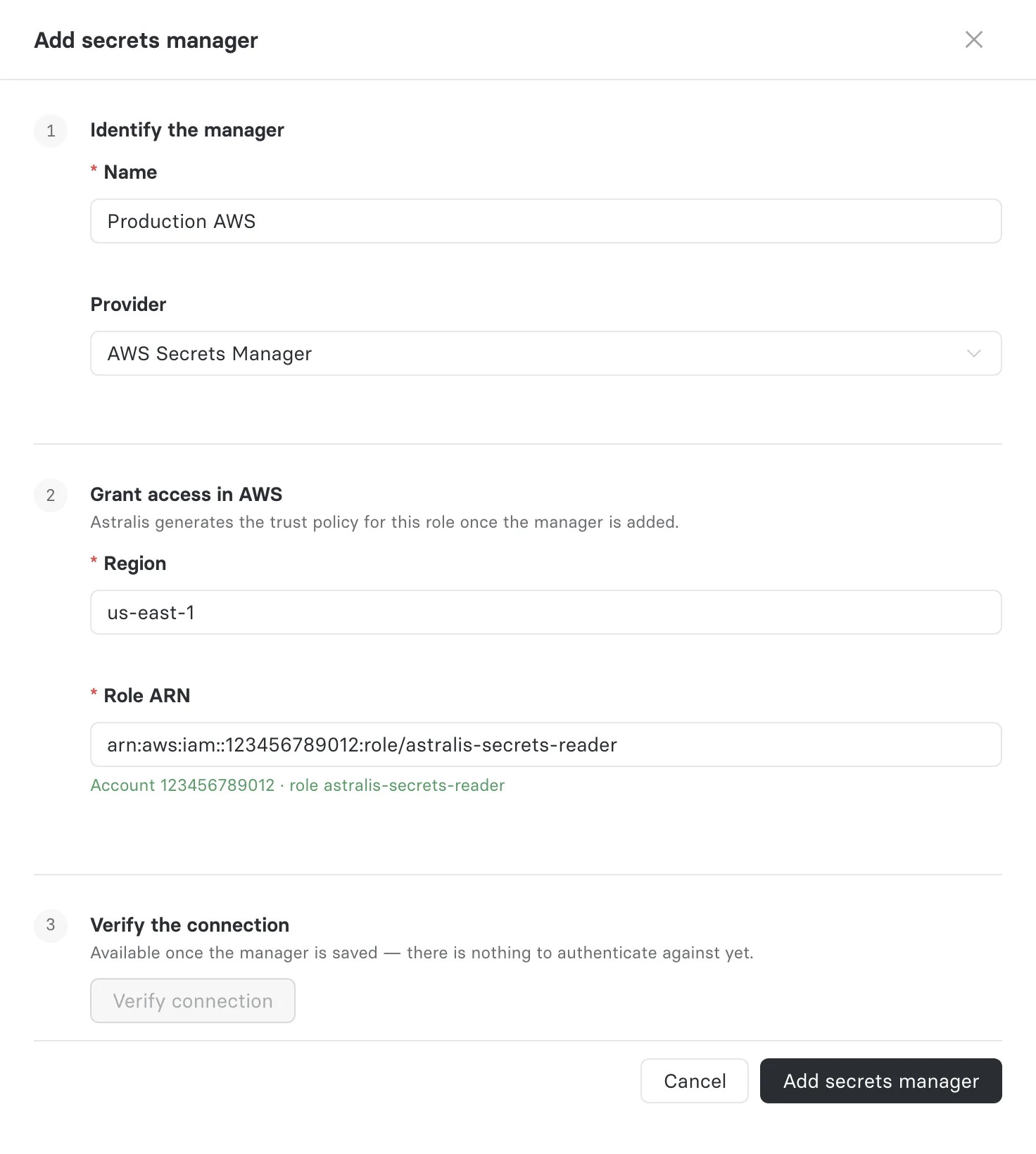
- Navigate to Settings → Secrets managers.
- Click Add secrets manager.
- Enter a Name and choose AWS Secrets Manager as the Provider. The provider cannot be changed later.
- Enter the Region your secrets are in, such as
us-east-1. - Enter the Role ARN of the role you created, such as
arn:aws:iam::123456789012:role/astralis-secrets-reader. - Click Add secrets manager.
Apply the trust policy to the role
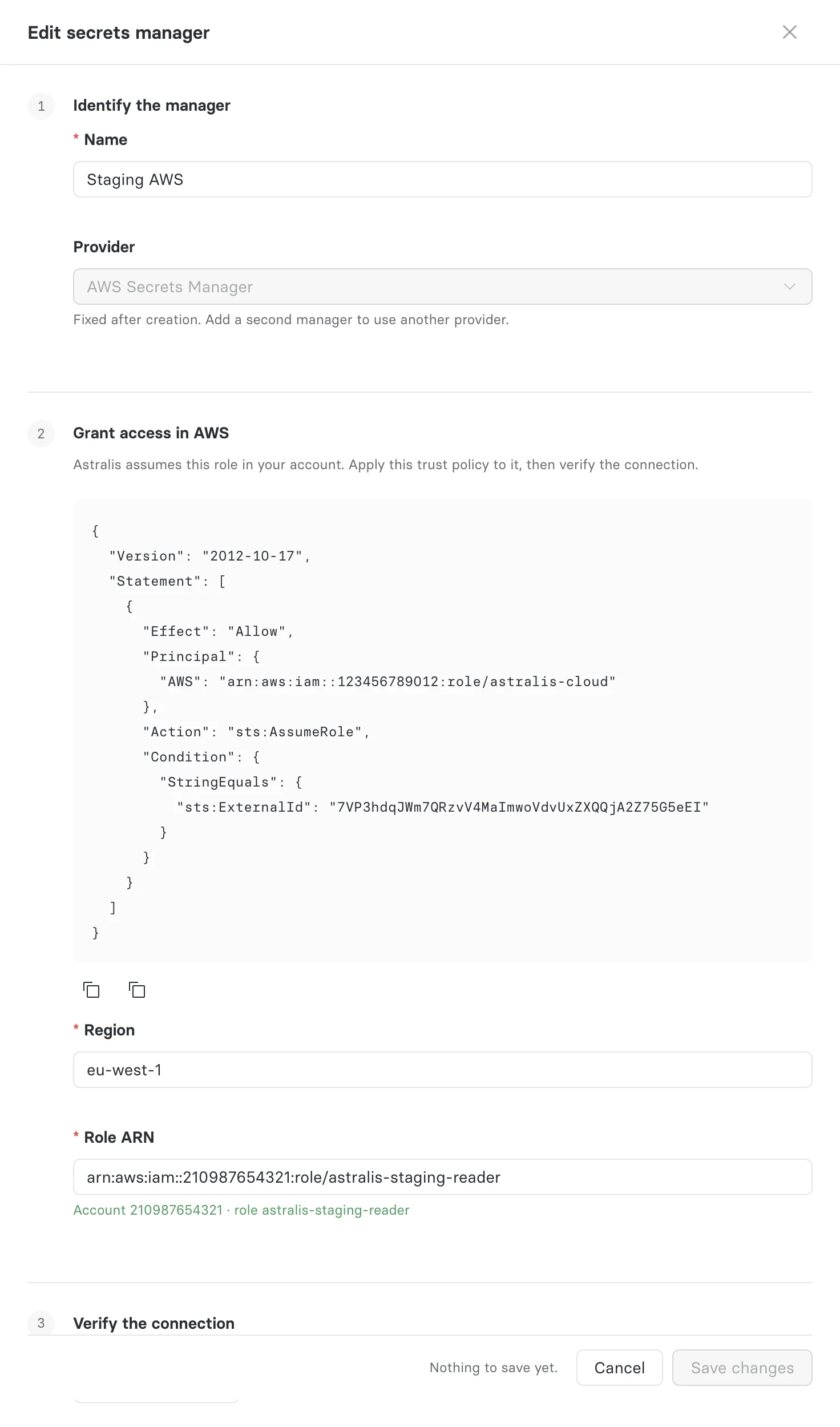
Once the manager is saved, its form shows the trust policy for the role. It allows the Astralis deployment's AWS principal to call sts:AssumeRole only when it presents this manager's ExternalId:
{
  "Version": "2012-10-17",
  "Statement": [
    {
      "Effect": "Allow",
      "Principal": { "AWS": "<Astralis principal ARN>" },
      "Action": "sts:AssumeRole",
      "Condition": { "StringEquals": { "sts:ExternalId": "<ExternalId>" } }
    }
  ]
}- Click Copy trust policy.
- In the AWS IAM console, open the role, choose Trust relationships → Edit trust policy, and replace the policy with the one you copied.
- Save the trust policy.
If the form shows This deployment cannot generate the trust policy, copy the ExternalId instead and add an sts:ExternalId condition with that value to the role's trust policy, allowing your Astralis deployment's AWS principal to assume it. On an Ethyca-hosted deployment, contact Ethyca support for the principal ARN. On a deployment you run, set FIDESPLUS__SECRETS_MANAGER__AWS_PRINCIPAL_ARN and restart; the form then shows the trust policy. See run your own deployment.
Verify the connection
Click Verify connection in the manager's form, or Test on the manager's row. A Healthy result means Astralis assumed the role.
The test authenticates only; it does not read a secret. Your permissions policy is proven when you check an integration's reference.
Reference a secret
An integration's reference names the secret in one of two forms:
| Form | Example |
|---|---|
| Secret name | astralis/billing-postgres |
| Full ARN | arn:aws:secretsmanager:us-east-1:123456789012:secret:astralis/billing-postgres-AbCdEf |
A name uses up to 512 characters from letters, digits, and /_+=.@-. A secret in another account needs its full ARN, a resource policy on the secret that grants the role access, and a customer managed KMS key whose key policy allows the role kms:Decrypt; the default aws/secretsmanager key cannot be used across accounts.
Use an AWS database secret
Secrets that AWS creates for databases do not always hold the keys Astralis needs:
| Secret | Works as-is? |
|---|---|
RDS managed master user secret (ManageMasterUserPassword) | No. It holds only username and password, and Astralis also needs host. Store a separate secret for a dedicated database user instead of the master user. |
| Credentials for Amazon RDS database secret | Yes, for PostgreSQL, MySQL, and SQL Server. Its host, port, username, password, and dbname match the Astralis keys; engine, dbInstanceIdentifier, and dbClusterIdentifier are ignored. dbname is optional in these secrets, so add it if it is missing. |
| Amazon Redshift or Redshift Serverless secret | No. Both use username and dbname; Astralis uses user and database. Store the secret with the Astralis key names. |
When in doubt, compare the secret with the integration's payload template and click Check.
Rotate the ExternalId
Rotate a manager's ExternalId when it may have leaked. Rotation takes effect immediately, with no overlap window, and the old value cannot be restored, so every integration using the manager stops connecting until you apply the new trust policy.
- On the Secrets managers page, open the manager's menu and choose Rotate ExternalId.
- Review how many integrations will fail, then click Rotate ExternalId.
- Copy the new trust policy and apply it to the role in IAM.
- Click Test on the manager. It reads as Never verified until you do.
Restrict which secrets integrations can reference
Set reference_prefix on a manager to limit which secrets its integrations can name, for example astralis/ or arn:aws:secretsmanager:us-east-1:123456789012:secret:astralis/. The prefix must end in / or : and is matched as a literal string, so a secret name and its ARN are different strings: pick the form your integrations use. A reference outside the prefix is refused without contacting AWS.
reference_prefix is set through the API only: PATCH /api/v1/plus/secrets-manager/{key} with details.reference_prefix. Supplying details replaces the whole object, so include the region and role ARN.
Network conditions that block Astralis
Astralis calls AWS STS at the manager region's regional endpoint and Secrets Manager over the public AWS endpoints. Conditions that allow only your own network deny those calls:
aws:SourceVpcoraws:SourceVpcein a resource policy on your secrets or KMS key, or in a service control or resource control policy that applies to them. Astralis does not come through your VPC endpoints, so the call is denied:AccessDeniedExceptionon reads, or an assume-role denial if a resource control policy covers STS. Exclude the Astralis role from the condition rather than loosening it for every principal.aws:SourceIp. Allow your deployment's egress addresses: your own network's on a deployment you run, or the addresses Ethyca support gives you for an Ethyca-hosted one.
Run your own deployment
On an Ethyca-hosted deployment, Ethyca manages the identity Astralis assumes your role from. On a deployment you run, Astralis gets its own AWS credentials from the standard AWS credential chain, such as an ECS task role, an EKS service account role, or an EC2 instance profile, and assumes each customer role from that identity. For the assume to work:
- Set
FIDESPLUS__SECRETS_MANAGER__AWS_PRINCIPAL_ARNto that role's ARN,arn:aws:iam::<account>:role/<name>including any path, not thearn:aws:sts::<account>:assumed-role/...session ARN. Name a dedicated role rather than the account root, which trusts every principal in the account allowed to callsts:AssumeRole. - Allow
sts:AssumeRoleon the customer role ARNs in the role's own IAM policy. A cross-account assume needs this as well as the customer's trust policy. - Run the web server and every worker as the same role. The trust policy names one principal, and workers read secrets while they process tasks such as privacy requests.
- Do not set static access keys (
AWS_ACCESS_KEY_ID,AWS_SECRET_ACCESS_KEY) in the environment. They come before the role in the credential chain, so Astralis would assume the customer role as that IAM user, which the trust policy does not name. - Allow outbound HTTPS to
sts.<region>.amazonaws.comandsecretsmanager.<region>.amazonaws.comfor each manager's region. Astralis always uses the regional STS endpoint, never the globalsts.amazonaws.com.
All secrets manager settings are listed in the configuration reference.