Configuring the Consent Metrics Dashboard
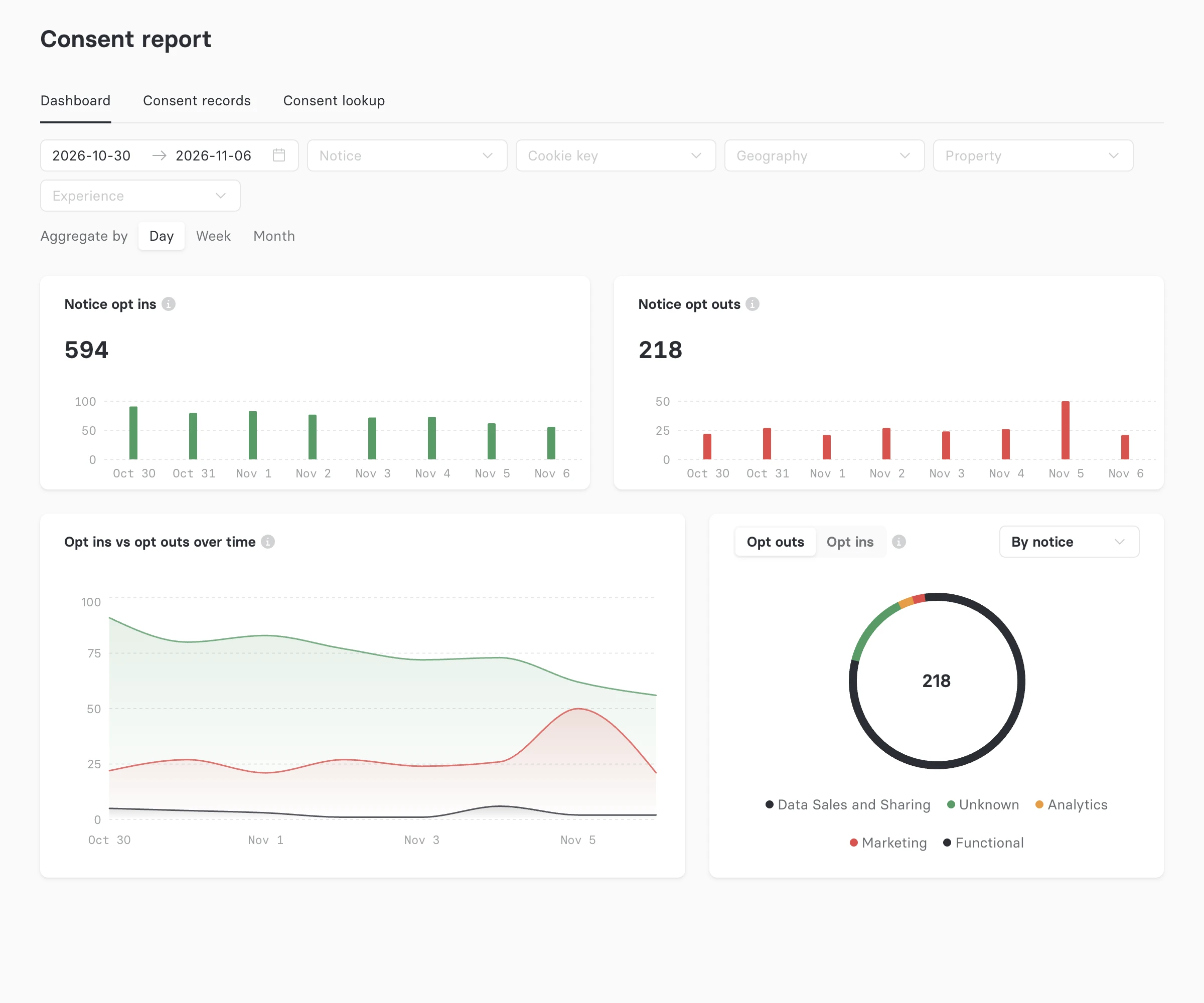
The consent metrics dashboard is a tab on the consent report that charts opt-in and opt-out trends over time, with a breakdown you can pivot by notice, geography, property, or experience. It reads from a daily rollup that a background task builds from your consent records, so the charts load quickly at any volume and you don't have to export records to spot a trend.
This guide shows how to turn the dashboard on, how far back its history reaches, and how to tune the background task that keeps it up to date.
The consent metrics dashboard takes two switches to turn on: a feature flag that shows the Dashboard tab, and the rollup setting that starts counting consent records. The tab stays empty until the rollup is enabled.
How the rollup works
A background task, the consent metrics rollup, counts new consent records into one bucket per UTC day. Each webserver enqueues the task on a fixed interval (every 15 minutes by default), and a worker runs it on the fidesplus.consent_metrics queue.
Each run does two kinds of work, in this order:
- Live sweep. Counts the records that arrived since the last run. Records become eligible two minutes after they're received, so the dashboard trails real time by up to one refresh interval plus two minutes.
- Backfill sweep. Counts historical records, newest first, until it reaches the start of the backfill window. The live sweep always goes first, so a long backfill never delays today's numbers.
Each run processes records in chunks: a chunk covers a fixed span of time (60 minutes by default) and commits in its own database transaction. By default, a run stops after 12 chunks, of which the backfill may use at most 8. A deployment that falls further behind than one run can clear catches up over the next scheduled runs.
The rollup counts each record exactly once, however many webservers enqueue it, and runs from different webservers never overlap.
Turn on the dashboard feature flag
Go to Settings > About Astralis in the admin UI and switch on Consent metrics dashboard in the Beta features section. The consent report gains a Dashboard tab next to Consent records and Consent lookup.
To set the flag at deploy time instead, set this environment variable on the webserver:
FIDESPLUS__FEATURE_FLAGS__CONSENT_METRICS_DASHBOARD=trueSee Feature Flags for how deploy-time values and admin overrides interact.
Route the consent metrics queue to a worker
The rollup runs on the fidesplus.consent_metrics Celery queue. A worker started without --queues consumes every queue, including this one, so the default "other" worker in the Helm chart already handles it. A worker started with --exclude-queues also consumes it, unless fidesplus.consent_metrics is in the excluded list.
If your workers name their queues explicitly with --queues, add fidesplus.consent_metrics to one of them, or start a dedicated worker:
fides worker --queues=fidesplus.consent_metricsThe rollup reads and writes the application database and needs no third-party network access. See Workers for how to size and route workers.
Choose a backfill window
metrics_backfill_days sets how many days of history the dashboard covers. The default is 365.
| Value | Effect |
|---|---|
Any positive number (default 365) | The backfill counts that many days back from the moment you first enable the rollup, or back to your oldest consent record, whichever is more recent. New records are counted from the first run, while the backfill is still in progress. |
0 | No history. The dashboard reports only from the moment you enable the rollup. |
You can change this setting at any time:
- Raising it extends the dashboard further into the past. The backfill sweep resumes and fills in the newly covered days.
- Lowering it has no effect on days already counted. The rollup never removes history it has aggregated.
The backfill runs in the background and fills in the most recent days first.
Estimate how long the backfill takes
The backfill covers a fixed span of time per run, whatever your volume of consent records. Each run counts metrics_max_backfill_chunks_per_run chunks of metrics_chunk_size_minutes each, and a run starts every metrics_refresh_interval_seconds. So the time to backfill the full window, in seconds, is:
backfill seconds = (metrics_backfill_days × 1440 ÷ metrics_chunk_size_minutes)
                   ÷ metrics_max_backfill_chunks_per_run
                   × metrics_refresh_interval_seconds
Divide the result by 86,400 to get days. With the defaults, a 365-day window takes about 11.4 days to backfill.
| Refresh interval | Chunk size | 90 days of history | 365 days of history |
|---|---|---|---|
900 (default) | 60 (default) | ~2.8 days | ~11.4 days |
300 | 60 | ~22.5 hours | ~3.8 days |
300 | 360 | ~3.75 hours | ~15 hours |
These estimates assume a full window of history and that each run finishes within one refresh interval. A deployment with less history than the window finishes sooner. To shorten the backfill, raise metrics_chunk_size_minutes or lower metrics_refresh_interval_seconds. See Tune the rollup for the trade-offs.
Enable the consent metrics rollup
metrics_rollup_enabled turns the rollup on. It is false by default. Set it with any one of these methods.
In fides.toml:
[consent]
metrics_rollup_enabled = true
metrics_backfill_days = 365
As environment variables on the webserver and workers:
FIDES__CONSENT__METRICS_ROLLUP_ENABLED=true
FIDES__CONSENT__METRICS_BACKFILL_DAYS=365
Through the API, with a token that has the config:update scope:
curl -X PATCH 'https://your-astralis-instance.example/api/v1/config' \
  -H 'Authorization: Bearer <access_token>' \
  -H 'Content-Type: application/json' \
  -d '{
    "plus_consent_settings": {
      "metrics_rollup_enabled": true,
      "metrics_backfill_days": 365
    }
  }'
Values set through the API take precedence over fides.toml and environment variables, and take effect without a restart. Every webserver checks every 5 minutes whether the rollup is on and how often it runs, and starts a run as soon as it sees the rollup switched on. To see the values set through the API, send GET /api/v1/config?api_set=true.
To turn the rollup off, set metrics_rollup_enabled back to false. Webservers stop enqueuing the task, and workers skip any runs already in the queue. The dashboard keeps the days already counted.
Verify the dashboard is filling in
- Go to Consent > Consent report and select the Dashboard tab.
- Confirm the Notice opt ins and Notice opt outs charts show today's records. They appear within one refresh interval of enabling the rollup.
- Check back over the following days: older dates fill in as the backfill sweep works back through the window.
Each run writes a structured log line on the worker with event=consent_metrics_rollup_run_complete. Its fields show how far behind the rollup is and how much of the backfill is done:
| Field | Meaning |
|---|---|
live_watermark_age_seconds | How far the live sweep trails real time. In steady state this stays under the refresh interval plus two minutes. |
backfill_progress | Share of the backfill window already counted, from 0 to 1. |
live_chunks, backfill_chunks | Chunks each sweep used in this run. |
caught_up | Whether the run cleared all outstanding work. |
The rollup also logs these events:
| Event | Level | When |
|---|---|---|
consent_metrics_backfill_complete | info | The backfill sweep reached the start of the window. |
consent_metrics_rollup_falling_behind | warning | The live sweep trails real time by more than two refresh intervals plus two minutes. Check that a worker is consuming fidesplus.consent_metrics. |
consent_metrics_rollup_run_slow | warning | A run took more than half its lock timeout. Check database read I/O. |
Tune the rollup
The defaults suit most deployments. Change them when the dashboard needs to update more often, the backfill needs to finish sooner, or the rollup puts too much load on your database.
| Setting | Default | Change it to |
|---|---|---|
metrics_refresh_interval_seconds | 900 (15 minutes) | Lower it for fresher numbers on the dashboard and a faster backfill. Minimum 60. A shorter interval also shortens the lock timeout; see Tune for high consent volume. |
metrics_chunk_size_minutes | 60 | Raise it to finish the backfill sooner when each chunk holds few records. Lower it if single rollup transactions take too long at your volume of consent records. |
metrics_max_backfill_chunks_per_run | 8 | Lower it to reduce the sustained load while the backfill runs. Raising it finishes the backfill sooner, but with the default metrics_max_chunks_per_run it can go no higher than 9; raise both together to go further. Doesn't affect the live sweep. |
metrics_max_chunks_per_run | 12 | Raise it so a run catches up on more missed time after an outage. Minimum 2. |
Every setting can be changed in fides.toml, as an environment variable with the FIDES__CONSENT__ prefix, or through PATCH /api/v1/config under plus_consent_settings. Changes to the interval apply at the next 5-minute check, and the other settings apply from the next run.
Keep the settings consistent
Two rules link these settings. Astralis refuses to start with a fides.toml or environment configuration that breaks either rule, and PATCH /api/v1/config rejects a change that would break one with a 422 response. The API checks the result of combining your request with the values already set, so a change to one setting can be rejected because of the other.
| Rule | With the defaults |
|---|---|
metrics_refresh_interval_seconds must be less than metrics_chunk_size_minutes × 60. This keeps a steady-state run to a single chunk. | 900 < 3600 |
metrics_max_backfill_chunks_per_run must be no more than 80% of metrics_max_chunks_per_run. This caps how much of each run the backfill can take, which keeps its sustained database load down. The live sweep always runs first, so the backfill never takes chunks the live sweep needs. | 8 ≤ 9.6 |
For example, to lower metrics_chunk_size_minutes to 10, also lower metrics_refresh_interval_seconds below 600 in the same request.
Tune for high consent volume
At millions of consent records per day, size chunks by how many records they hold, not by how much time they cover. At 20 million records per day, a default 60-minute chunk holds about 830,000 records in a single transaction, and backfill chunks read historical data that is usually not in the database cache.
Each run holds a lock for at most 30 × metrics_max_chunks_per_run seconds or 2 × metrics_refresh_interval_seconds, whichever is larger. With the defaults that is 1,800 seconds; with a 300-second refresh interval it drops to 600 seconds. A run that takes more than half the lock timeout logs consent_metrics_rollup_run_slow. A run that outlasts the lock never counts a record twice, but a second run can start alongside it and add to the database load.
For a high-volume deployment:
- Start with smaller chunks, such as
metrics_chunk_size_minutes = 15. With a 300-second refresh interval, a 90-day backfill then takes about 3.75 days. - Start with a shorter
metrics_backfill_days, such as90. Raising it later resumes the backfill from where it stopped. - Watch database CPU and I/O for the first hour, and divide
backfill_secondsbybackfill_chunksin the run log to get the time per chunk. If chunks finish well within the lock timeout, raisemetrics_chunk_size_minutesto finish the backfill sooner.
Configuration reference
All consent metrics settings live in the [consent] section. See the Consent extension settings for the full table alongside the other consent settings.