Configure Pre-Approval Webhooks
What is a Pre-Approval webhook?
A pre-approval webhook is an HTTPS callback that calls an external REST API endpoint as soon as a privacy request is received (or after user identity verification, if that is configured).
The response(s) to the callback allow us to determine whether or not the privacy request is eligible to be automatically approved. If all webhooks respond with eligible, Fides automatically approves the privacy request for execution. If any webhook responds with not eligible, the request is flagged for manual review by an administrator in the Admin UI — it is not denied.
Why use pre-approval webhooks?
Pre-approval webhooks are useful when you need to integrate external business logic or validation before automatically processing a privacy request. Common use cases include:
- Checking if a customer has an active support ticket or pending transaction that should be resolved first
- Verifying that the requester meets certain criteria in your CRM or customer database
- Integrating with third-party compliance systems that need to review requests
- Applying custom business rules that determine whether a request can be auto-approved
To enable Pre-Approval webhooks, the require_manual_request_approval variable must be set to true. This is required to trigger and process pre-approval webhooks. You can find more information about this variable and how to set it in the execution configuration variables docs
Request lifecycle with pre-approval webhooks
When pre-approval webhooks are configured, a privacy request follows this lifecycle:
- Request submitted. A subject submits a privacy request.
- Identity verified (if configured). The subject verifies their identity via email code.
- Awaiting external review. Fides fires all configured pre-approval webhooks and waits for responses from your external systems. An administrator can also manually approve or deny the request at any point during this stage without waiting for webhook responses.
- Based on the webhook responses, one of two things happens:
- All webhooks respond "eligible." Fides automatically approves the request and begins processing. No manual action needed.
- Any webhook responds "not eligible." The request moves to Manual review required status, where it must be manually approved or denied by an administrator in the Admin UI.
Pre-approval webhook responses and status changes are recorded in the activity timeline for each privacy request, giving administrators full visibility into which external systems responded and how.
Configuration
Pre-approval webhooks can be configured through the Admin UI or via the API.
Configure via the Admin UI
Navigate to Privacy requests > Pre-approval webhooks in the left sidebar to manage your webhooks.
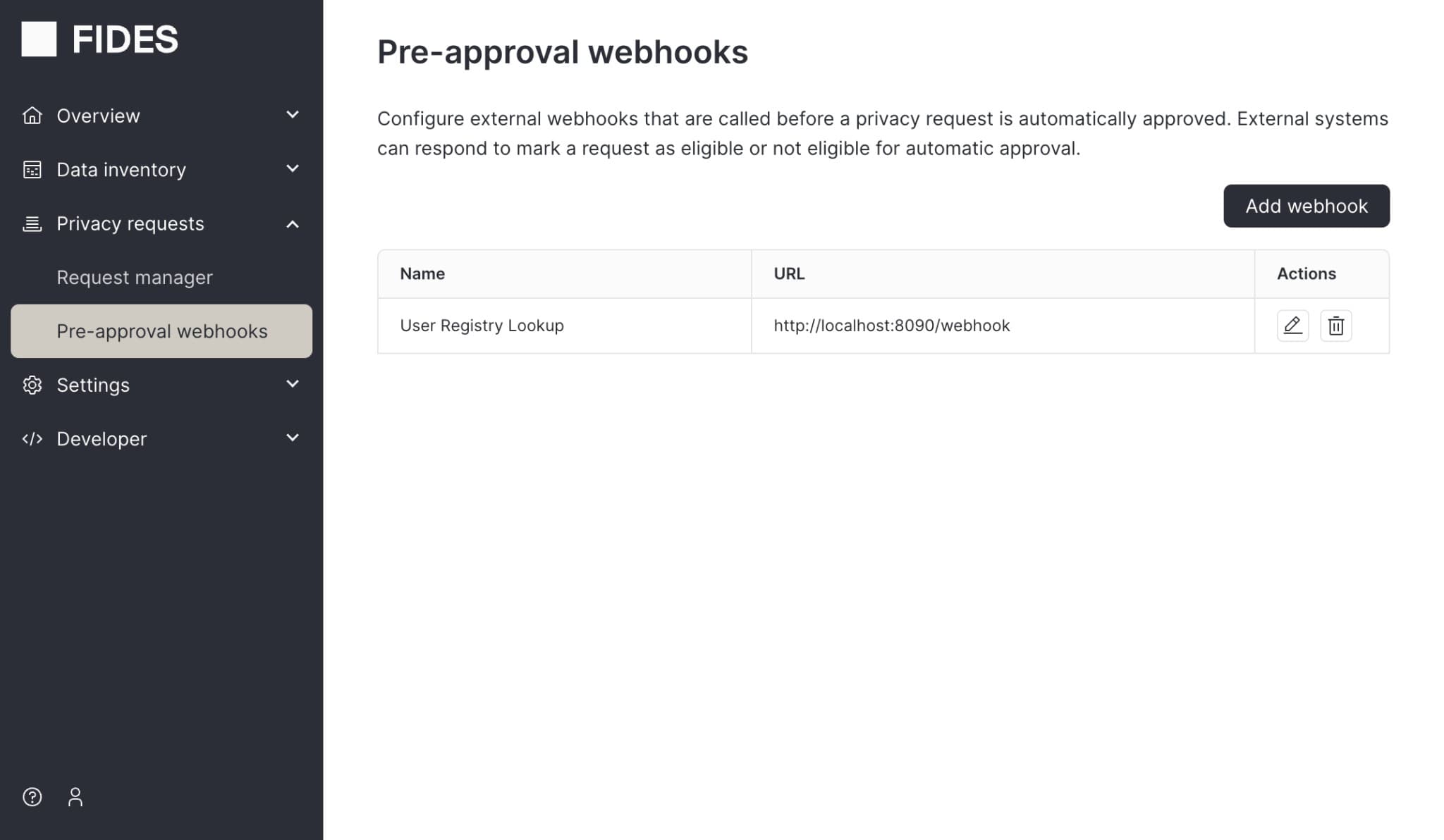
From this page you can:
- Add a webhook. Click the Add webhook button and provide a name, the endpoint URL of your external service, and an authorization header (e.g. a Bearer token or API key).
- Edit a webhook. Click the edit icon in the Actions column to update the webhook name or endpoint URL. Leave the authorization header blank to keep the existing value.
- Delete a webhook. Click the delete icon in the Actions column to remove a webhook.
Configure via the API
You can also configure pre-approval webhooks programmatically using the Fides API. This involves three steps: creating an HTTPS connection, adding connection secrets, and defining the webhook.
Create an HTTPS Connection
The information that describes how to connect to your API endpoint is represented by a Connection.
[
    {
      "name": "My Service Config",
      "key": "my_service_config",
      "connection_type": "https",
      "access": "read"
    }
]
Add your Connection secrets
The credentials needed to access your API endpoint are defined by making a PUT to the Connection Secrets endpoint. These credentials are encrypted and securely stored in Fides.
    {
        "url": "{service-url}/pre-approval-handler",
        "authorization": "test_authorization",
        "headers": { // optional headers to be attached to the request
          "User-Agent": "Example"
        }
    }
Define pre-approval webhooks
After you've defined a new Connection, you can create lists of webhooks to run as soon as a privacy request is received.
To create a list of PreApprovalWebhooks:
[
   {
      "connection_config_key":"my_service_config",
      "name":"My test webhook",
      "key":"my_test_webhook"
   },
   {
      "connection_config_key":"my_other_service_config",
      "name":"My test webhook 2",
      "key":"my_test_webhook_2"
   }
]
This creates two webhooks that will both run as soon as a privacy request is created.
This means your webhook with the key my_service_config will receive an API call from Fides at {service-url}/pre-approval-handler (or whatever URL / path you have set in your Connection Config). Same with your webhook with the key my_other_service_config.
Update a single webhook
To update a single webhook, send a PATCH request to update selected attributes.
The following example will update the PreApprovalWebhook with key my_test_webhook to be Some other name instead of
My test webhook.
{
    "name": "Some other name"
}
Webhook request format
Fides will send requests to any configured webhooks with the following request body:
{
  "privacy_request_id": "pri_029832ba-3b84-40f7-8946-82aec6f95448",
  "privacy_request_status": "pending",
  "direction": "two_way", // this is always two_way for pre-approval webhooks, meaning your service must use one of the reply paths in the request headers mentioned below
  "callback_type": "pre_approval",
  "identity": {
    "email": "customer-1@example.com",
    "phone_number": "555-5555"
  },
  "policy_action": "access" //  other policy actions are consent, erasure, update
}
These attributes were configured at the time of webhook creation. Known identities are also embedded in the request.
Fides includes specific headers including data needed to respond to the webhook:
{
  "reply-to-eligible": "/privacy-request/{privacy_request_id}/pre-approve/eligible",
  "reply-to-not-eligible": "/privacy-request/{privacy_request_id}/pre-approve/not-eligible",
  "reply-to-token": "<jwe_token>"
}
Responding to the webhook
You have 2 options to respond to the webhook:
-
If your service has determined the privacy request is eligible to be automatically approved, send a request to the
reply-to-eligibleURL sent in the original request header, along with thereply-to-tokenauth token. -
If your service has determined the privacy request is not eligible to be automatically approved, send a request to the
reply-to-not-eligibleURL sent in the original request header, along with thereply-to-tokenauth token. This does not deny the request. Instead, it flags the request for manual review by an administrator in the Admin UI.
Send an empty {} request body.
For example, to mark the privacy request as eligible:
POST /api/v1/privacy-request/{privacy_request_id}/pre-approve/eligibleMake sure to include the Authorization header: Authorization: Bearer {reply_to_token}
Error Handling
If a webhook fails to respond, times out, or returns an error:
- The privacy request will remain in a pending state (shown as status "New" in the Privacy Request UI) awaiting manual approval
- The webhook failure will be logged for debugging
- Other configured webhooks will still be called and can respond independently
- You can manually approve the request in the Admin UI at any time
This ensures that privacy requests are never automatically approved if any part of your validation logic fails or is unreachable.